Example : How to open a Page/MDI after a successful Login in C#?
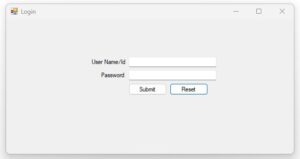
using System;
using System.Data;
using System.Drawing;
using System.Linq;
using System.Text;
using System.Data.SqlClient;
using System.Windows.Forms;

namespace WindowsFormsApplication1
{
    public partial class Login : Form
    {
        //connectivity code

        SqlConnection con = new SqlConnection(@"Data Source=RKM;Initial Catalog=CSharpDB;Integrated Security=True");
        public Login()
        {
            InitializeComponent();
        }

        private void Login_Load(object sender, EventArgs e)
        {
            // Hide password characters
            TxtPasswd.UseSystemPasswordChar = true;

            TxtUserName.Focus();
        }

        private void BtnSubmit_Click(object sender, EventArgs e)
        {
            // Check User Name
            if (TxtUserName.Text.Trim() == "")
            {
                MessageBox.Show(
                    "Please enter User Name/Id.",
                    "Login",
                    MessageBoxButtons.OK,
                    MessageBoxIcon.Warning);

                TxtUserName.Focus();
                return;
            }

            // Check Password
            if (TxtPasswd.Text.Trim() == "")
            {
                MessageBox.Show(
                    "Please enter Password.",
                    "Login",
                    MessageBoxButtons.OK,
                    MessageBoxIcon.Warning);

                TxtPasswd.Focus();
                return;
            }

            try
            {
                // Check username and password
                string sql = @"SELECT COUNT(*)
                               FROM UserRegistration
                               WHERE UserName = @UserName
                               AND Password = @Password";

                SqlCommand cmd = new SqlCommand(sql, con);

                cmd.Parameters.AddWithValue(
                    "@UserName",
                    TxtUserName.Text.Trim());

                cmd.Parameters.AddWithValue(
                    "@Password",
                    TxtPasswd.Text);

                // Open connection
                if (con.State == ConnectionState.Closed)
                {
                    con.Open();
                }

                int count = Convert.ToInt32(cmd.ExecuteScalar());

                // Check login
                if (count > 0)
                {
                    MessageBox.Show(
                        "Login Successful.",
                        "Login",
                        MessageBoxButtons.OK,
                        MessageBoxIcon.Information);

                    // Open User Registration Form named as Form1
                    Form1 frm = new Form1();
                    frm.Show();

                    // Hide Login Form
                    this.Hide();
                }
                else
                {
                    MessageBox.Show(
                        "Invalid User Name or Password.",
                        "Login Failed",
                        MessageBoxButtons.OK,
                        MessageBoxIcon.Error);

                    TxtPasswd.Clear();
                    TxtPasswd.Clear();
                    TxtUserName.Focus();
                }
            }
            catch (Exception ex)
            {
                MessageBox.Show(
                    "Error: " + ex.Message,
                    "Database Error",
                    MessageBoxButtons.OK,
                    MessageBoxIcon.Error);
            }
            finally
            {
                if (con.State == ConnectionState.Open)
                {
                    con.Close();
                }
            }
        }

        private void BtnReset_Click(object sender, EventArgs e)
        {
            TxtUserName.Clear();
            TxtPasswd.Clear();

            TxtUserName.Focus();
        }
    }
}

0 Comments