Example : How to validate and open an MDI page after a successful Login in Java?
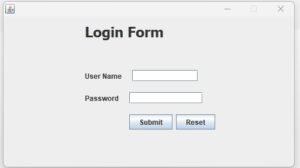
import java.sql.*;
import javax.swing.*;

public class LoginForm extends javax.swing.JFrame
{

    Connection conn;
    PreparedStatement pst;
    ResultSet rs;

    public LoginForm()
    {
        initComponents();

        this.setResizable(false);   // Not resizable the Login form
        this.setLocationRelativeTo(null); // Center the Login form

        connect();
    }


    public void connect()
    {
        try
        {
            Class.forName("oracle.jdbc.driver.OracleDriver");

            conn = DriverManager.getConnection(
                    "jdbc:oracle:thin:@localhost:1521:orcl",
                    "system",
                    "raj"
            );
        }
        catch (Exception e)
        {
            JOptionPane.showMessageDialog(this, "Connection Error: " + e);
        }
    }


    private void loginCheck()
    {
        try
        {
            String uname = TxtUserName.getText().trim();
            String pass = new String(TxtPassword.getPassword());

            if (uname.equals("") || pass.equals(""))
            {
                JOptionPane.showMessageDialog(this, "Please enter User Name and Password");
                return;
            }

            String sql = "SELECT * FROM UREG WHERE UNAME5=? AND PASSWORD5=?";

            pst = conn.prepareStatement(sql);
            pst.setString(1, uname);
            pst.setString(2, pass);

            rs = pst.executeQuery();

            if (rs.next())
            {
                JOptionPane.showMessageDialog(this, "Login Successful");

                //Opens a MDI Page (MdiPage.java)
                MdiPage obj = new MdiPage();
                obj.setVisible(true);

                this.dispose(); //closes login page
            }
            else
            {
                JOptionPane.showMessageDialog(this, "Invalid User Name or Password");
                TxtUserName.setText("");
                TxtPassword.setText("");
                TxtUserName.requestFocus();
            }

        }
        catch (Exception e)
        {
            JOptionPane.showMessageDialog(this, "Login Error: " + e);
        }
    }


    private void resetForm()
    {
        TxtUserName.setText("");
        TxtPassword.setText("");
        TxtUserName.requestFocus();
    }


    //@SuppressWarnings("unchecked")
    //---

    private void BtnResetActionPerformed(java.awt.event.ActionEvent evt) {
        resetForm();
    }

    private void BtnSubmitActionPerformed(java.awt.event.ActionEvent evt) {
        loginCheck();
    }


    public static void main(String args[]) {

        java.awt.EventQueue.invokeLater(new Runnable() {
            public void run() {
                new LoginForm().setVisible(true);
            }
        });
    }

    // Variables declaration - do not modify
    private javax.swing.JButton BtnReset;
    private javax.swing.JButton BtnSubmit;
    private javax.swing.JPasswordField TxtPassword;
    private javax.swing.JTextField TxtUserName;
    private javax.swing.JLabel jLabel1;
    private javax.swing.JLabel jLabel2;
    private javax.swing.JLabel jLabel3;
    // End of variables declaration
}

0 Comments