Table of Contents
hide
Example : PHP Code for Home/Dashboard Page in Left-Side-Panel Format.
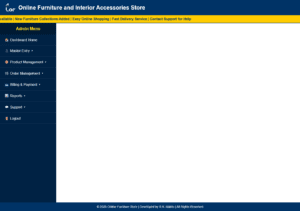
STEP 1 : Create a Login page (as login/index.php) first and after successful validation open Dashboard page (dashboard.php). Even, we can also run dashboard page directly.

STEP 2 :

dashboard.php

<!DOCTYPE html>
<html>
<head>
    <title>Admin Dashboard</title>

    <style>
        body {
            margin: 0;
            font-family: Arial, sans-serif;
            background: #f2f6fc;
        }

        .header {
            height: 70px;
            background: #003366;
            color: white;
            display: flex;
            align-items: center;
            padding-left: 25px;
            font-size: 26px;
            font-weight: bold;
        }

        .marquee-box
        {
            height:35px;
            background:#ffcc00;
            color:#003366;
            line-height:35px;
            font-size:16px;
            font-weight:bold;
            border-bottom:2px solid #003366;
        }

        .header img {
            width: 45px;
            height: 45px;
            margin-right: 15px;
            border-radius: 50%;
        }

        .main {
            display: flex;
            height: calc(100vh - 110px);
        }

        .sidebar {
            width: 260px;
            background: #002244;
            color: white;
            overflow-y: auto;
        }

        .sidebar h3 {
            text-align: center;
            padding: 15px;
            margin: 0;
            background: #001a33;
            color: #ffcc00;
        }

        .menu {
            list-style: none;
            padding: 0;
            margin: 0;
        }

        .menu li {
            border-bottom: 1px solid #1b3d5c;
        }

        .menu a {
            display: block;
            color: white;
            text-decoration: none;
            padding: 14px 20px;
            font-size: 16px;
        }

        .menu a:hover {
            background: #00509e;
        }

        .submenu {
            display: none;
            background: #003366;
        }

        .submenu a {
            padding-left: 45px;
            font-size: 15px;
        }

        .menu li:hover .submenu {
            display: block;
        }

        .content {
            flex: 1;
            background: white;
        }

        iframe {
            width: 100%;
            height: 100%;
            border: none;
        }

        .footer {
            height: 40px;
            background: #003366;
            color: white;
            text-align: center;
            line-height: 40px;
            font-size: 14px;
        }
    </style>
</head>

<body>

<div class="header">
    <img src="image/logo.png" alt="Logo">
    Online Furniture and Interior Accessories Store
</div>

<div class="marquee-box">

    <marquee behavior="scroll"
             direction="left"
             scrollamount="6">

        🛋 Welcome to Online Furniture and Interior Accessories Store |
        Latest Offers Available |
        New Furniture Collections Added |
        Easy Online Shopping |
        Fast Delivery Service |
        Contact Support for Help

    </marquee>

</div>

<div class="main">

    <div class="sidebar">
        <h3>Admin Menu</h3>

        <ul class="menu">

            <li>
                <a href="home.php" target="pageframe">🏠 Dashboard Home</a>
            </li>

            <li>
                <a href="#">👤 Master Entry ▾</a>
                <div class="submenu">
                    <a href="customer.php" target="pageframe">Customer Master</a>
                    <a href="furniture.php" target="pageframe">Furniture Master</a>
                    <a href="accessories.php" target="pageframe">Interior Accessories</a>
                </div>
            </li>

            <li>
                <a href="#">📦 Product Management ▾</a>
                <div class="submenu">
                    <a href="stock.php" target="pageframe">Stock Details</a>
                    <a href="discount.php" target="pageframe">Discount & Offer</a>
                    <a href="search.php" target="pageframe">Search Product</a>
                </div>
            </li>

            <li>
                <a href="#">🛒 Order Management ▾</a>
                <div class="submenu">
                    <a href="cart.php" target="pageframe">Shopping Cart</a>
                    <a href="order.php" target="pageframe">Order Booking</a>
                    <a href="delivery.php" target="pageframe">Delivery & Shipping</a>
                </div>
            </li>

            <li>
                <a href="#">💳 Billing & Payment ▾</a>
                <div class="submenu">
                    <a href="invoice.php" target="pageframe">Invoice & Billing</a>
                    <a href="payment.php" target="pageframe">Payment Details</a>
                </div>
            </li>

            <li>
                <a href="#">📊 Reports ▾</a>
                <div class="submenu">
                    <a href="customer_report.php" target="pageframe">Customer Report</a>
                    <a href="sales_report.php" target="pageframe">Sales Report</a>
                    <a href="stock_report.php" target="pageframe">Stock Report</a>
                </div>
            </li>

            <li>
                <a href="#">💬 Support ▾</a>
                <div class="submenu">
                    <a href="complaint.php" target="pageframe">Complaint & Suggestion</a>
                    <a href="feedback.php" target="pageframe">Feedback & Review</a>
                    <a href="faq.php" target="pageframe">FAQ</a>
                </div>
            </li>

            <li>
                <a href="logout.php">🚪 Logout</a>
            </li>

        </ul>
    </div>

    <div class="content">
        <iframe src="home.php" name="pageframe"></iframe>
    </div>

</div>

<div class="footer">
    © <?php echo date("Y"); ?> Online Furniture Store | Developed by R.K. Mahto | All Rights Reserved
</div>

</body>
</html>

STEP 3 : Now create several other pages which can be included in dashboard such as home.php, customer.php, employee.php etc.

home.php

<!DOCTYPE html>
<html>
<head>
    <title>Home</title>
</head>
<body style="font-family:Arial; padding:30px;">
    <h1>Welcome to Admin Dashboard</h1>
    <p>Select any menu from the left sidebar to open the page here.</p>
</body>
</html>
Example : PHP Code for a Home/Dashboard Page in Top-Bottom-Panel Format, and open all pages in an iframe.
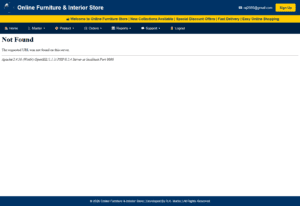
STEP 1 : Create a Login page (as login/index.php) first and after successful validation open Dashboard page (dashboard.php). Even, we can also run dashboard page directly.

STEP 2 :

dashboard.php

<!DOCTYPE html>
<html>
<head>
    <title>Advanced Dashboard</title>

    <style>

        body{
            margin:0;
            font-family:Arial;
            background:#f2f6fc;
        }

        /* HEADER */

        .header{
            height:70px;
            background:#003366;
            color:white;
            display:flex;
            align-items:center;
            justify-content:space-between;
            padding-left:20px;
            padding-right:20px;
        }

        .header-left{
            display:flex;
            align-items:center;
            font-size:26px;
            font-weight:bold;
        }

        .header-left img{
            width:45px;
            height:45px;
            margin-right:15px;
            border-radius:50%;
        }

        .header-right{
            display:flex;
            align-items:center;
            gap:15px;
        }

        .header-right a{
            color:white;
            text-decoration:none;
            font-size:15px;
        }

        .signup-btn{
            background:#ffcc00;
            color:#003366 !important;
            padding:10px 18px;
            border-radius:5px;
            font-weight:bold;
        }

        .signup-btn:hover{
            background:white;
        }

        /* MARQUEE */

        .marquee-box{
            height:35px;
            background:#ffcc00;
            color:#003366;
            line-height:35px;
            font-size:16px;
            font-weight:bold;
        }

        /* MENU */

        .menu{
            background:#002244;
        }

        .menu ul{
            list-style:none;
            margin:0;
            padding:0;
        }

        .menu ul li{
            position:relative;
            display:inline-block;
        }

        .menu ul li a{
            display:block;
            color:white;
            padding:15px 18px;
            text-decoration:none;
            font-size:15px;
        }

        .menu ul li a:hover{
            background:#00509e;
        }

        /* SUBMENU */

        .submenu{
            display:none;
            position:absolute;
            background:#003366;
            min-width:220px;
            z-index:1000;
        }

        .submenu li{
            display:block !important;
            position:relative;
        }

        .submenu li a{
            border-bottom:1px solid #1b3d5c;
        }

        .menu li:hover > .submenu{
            display:block;
        }

        /* SUB SUB MENU */

        .subsubmenu{
            display:none;
            position:absolute;
            left:220px;
            top:0;
            background:#004080;
            min-width:220px;
        }

        .submenu li:hover > .subsubmenu{
            display:block;
        }

        /* CONTENT */

        .content{
            height:calc(100vh - 185px);
            background:white;
        }

        iframe{
            width:100%;
            height:100%;
            border:none;
        }

        /* FOOTER */

        .footer{
            height:45px;
            background:#003366;
            color:white;
            text-align:center;
            line-height:45px;
            font-size:14px;
        }

    </style>
</head>

<body>

<!-- HEADER -->

<div class="header">

    <div class="header-left">

        <img src="image/logo.png">

        Online Furniture & Interior Store

    </div>

    <div class="header-right">

        <a href="mailto:[email protected]">
            📧 [email protected]
        </a>

        <a href="signup.php" target="pageframe" class="signup-btn">
            Sign Up
        </a>

    </div>

</div>

<!-- MARQUEE -->

<div class="marquee-box">

    <marquee scrollamount="6">

        🛋 Welcome to Online Furniture Store |
        New Collections Available |
        Special Discount Offers |
        Fast Delivery |
        Easy Online Shopping

    </marquee>

</div>

<!-- MENU -->

<div class="menu">

<ul>

    <li>
        <a href="home.php" target="pageframe">🏠 Home</a>
    </li>

    <!-- MASTER -->

    <li>

        <a href="#">👤 Master ▾</a>

        <ul class="submenu">

            <li>
                <a href="customer.php" target="pageframe">
                    Customer Master
                </a>
            </li>

            <li>

                <a href="#">
                    Furniture Master ▸
                </a>

                <!-- SUB SUB MENU -->

                <ul class="subsubmenu">

                    <li>
                        <a href="sofa.php" target="pageframe">
                            Sofa Details
                        </a>
                    </li>

                    <li>
                        <a href="bed.php" target="pageframe">
                            Bed Details
                        </a>
                    </li>

                    <li>
                        <a href="chair.php" target="pageframe">
                            Chair Details
                        </a>
                    </li>

                </ul>

            </li>

            <li>
                <a href="accessories.php" target="pageframe">
                    Interior Accessories
                </a>
            </li>

        </ul>

    </li>

    <!-- PRODUCT -->

    <li>

        <a href="#">📦 Product ▾</a>

        <ul class="submenu">

            <li>
                <a href="stock.php" target="pageframe">
                    Stock Details
                </a>
            </li>

            <li>
                <a href="discount.php" target="pageframe">
                    Discount & Offer
                </a>
            </li>

            <li>
                <a href="search.php" target="pageframe">
                    Search Product
                </a>
            </li>

        </ul>

    </li>

    <!-- ORDER -->

    <li>

        <a href="#">🛒 Orders ▾</a>

        <ul class="submenu">

            <li>
                <a href="cart.php" target="pageframe">
                    Shopping Cart
                </a>
            </li>

            <li>
                <a href="order.php" target="pageframe">
                    Order Booking
                </a>
            </li>

            <li>
                <a href="delivery.php" target="pageframe">
                    Delivery & Shipping
                </a>
            </li>

        </ul>

    </li>

    <!-- REPORT -->

    <li>

        <a href="#">📊 Reports ▾</a>

        <ul class="submenu">

            <li>
                <a href="customer_report.php" target="pageframe">
                    Customer Report
                </a>
            </li>

            <li>
                <a href="sales_report.php" target="pageframe">
                    Sales Report
                </a>
            </li>

        </ul>

    </li>

    <!-- SUPPORT -->

    <li>

        <a href="#">💬 Support ▾</a>

        <ul class="submenu">

            <li>
                <a href="feedback.php" target="pageframe">
                    Feedback
                </a>
            </li>

            <li>
                <a href="complaint.php" target="pageframe">
                    Complaint
                </a>
            </li>

            <li>
                <a href="faq.php" target="pageframe">
                    FAQ
                </a>
            </li>

        </ul>

    </li>

    <li>
        <a href="logout.php" target="pageframe">
            🚪 Logout
        </a>
    </li>

</ul>

</div>

<!-- CONTENT -->

<div class="content">

    <iframe src="home.php" name="pageframe"></iframe>

</div>

<!-- FOOTER -->

<div class="footer">

    © <?php echo date("Y"); ?>

    Online Furniture & Interior Store |

    Developed By R.K. Mahto |

    All Rights Reserved

</div>

</body>
</html>


STEP 3 : Now create several other pages which can be included in dashboard such as home.php, customer.php, employee.php etc.

home.php

<!DOCTYPE html>
<html>
<head>
    <title>Home</title>
</head>
<body style="font-family:Arial; padding:30px;">
    <h1>Welcome to Admin Dashboard</h1>
    <p>Select any menu from the top menu bar. The selected page will open here.</p>
</body>
</html>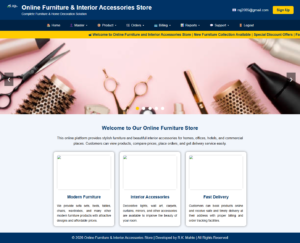
The above image is the Home page, while the page below is after opening the Feedback page in the Support menu option.
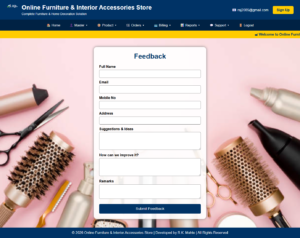
NB: We can run index.php file in this case. We can also link this page with Login validation.


----------------------  style.css  ----------------------

* {
    box-sizing: border-box;
}

html, body {
    margin: 0;
    padding: 0;
    font-family: Arial;
    background: #f2f6fc;
}

/* HEADER */
.header {
    background: #003366;
    color: white;
    padding: 18px 30px;
    display: flex;
    align-items: center;
    justify-content: space-between;
}

.logo-title {
    display: flex;
    align-items: center;
}

.logo-title img {
    width: 55px;
    height: 55px;
    margin-right: 15px;
    border-radius: 50%;
}

.main-title {
    font-size: 28px;
    font-weight: bold;
}

.sub-title {
    font-size: 14px;
    margin-top: 5px;
}

.header-right a {
    color: white;
    text-decoration: none;
    margin-left: 15px;
}

.signup-btn {
    background: #ffcc00;
    color: #003366 !important;
    padding: 10px 18px;
    border-radius: 5px;
    font-weight: bold;
}

/* MENU */
.menu {
    background: #002244;
    text-align: center;
    position: relative;
    z-index: 9999;
}

.menu ul {
    list-style: none;
    margin: 0;
    padding: 0;
}

.menu ul li {
    display: inline-block;
    position: relative;
}

.menu ul li a {
    display: block;
    color: white;
    padding: 15px 18px;
    text-decoration: none;
    font-size: 15px;
}

.menu ul li a:hover {
    background: #00509e;
}

.submenu {
    display: none;
    position: absolute;
    top: 100%;
    left: 0;
    background: #003366;
    min-width: 220px;
    z-index: 10000;
    text-align: left;
}

.submenu li {
    display: block !important;
    width: 100%;
}

.submenu li a {
    border-bottom: 1px solid #1b3d5c;
    white-space: nowrap;
}

.menu li:hover > .submenu {
    display: block;
}

.subsubmenu {
    display: none;
    position: absolute;
    left: 220px;
    top: 0;
    background: #004080;
    min-width: 220px;
}

.submenu li:hover > .subsubmenu {
    display: block;
}

/* MARQUEE */
.marquee-box {
    height: 35px;
    background: #ffcc00;
    color: #003366;
    line-height: 35px;
    font-size: 16px;
    font-weight: bold;
    margin: 0;
    padding: 0;
}

/* SLIDER FIXED POSITION */
.slider {
    width: 100%;
    height: 350px;
    position: relative;
    overflow: hidden;
    background: #ddd;
    margin: 0;
    padding: 0;
    clear: both;
    z-index: 1;
}

.slide {
    display: none;
    width: 100%;
    height: 350px;
    margin: 0;
    padding: 0;
}

.slide img {
    width: 100%;
    height: 350px;
    object-fit: cover;
    display: block;
    margin: 0;
    padding: 0;
}

.prev, .next {
    position: absolute;
    top: 45%;
    background: rgba(0,0,0,0.5);
    color: white;
    border: none;
    padding: 15px;
    font-size: 24px;
    cursor: pointer;
    z-index: 5;
}

.prev {
    left: 20px;
}

.next {
    right: 20px;
}

.dots {
    position: absolute;
    bottom: 15px;
    width: 100%;
    text-align: center;
    z-index: 5;
}

.dot {
    height: 15px;
    width: 15px;
    margin: 0 5px;
    background-color: white;
    border-radius: 50%;
    display: inline-block;
    cursor: pointer;
}

.active {
    background-color: #ffcc00;
}

/* INFO SECTION */
.info-section {
    padding: 30px;
    text-align: center;
}

.info-section h2 {
    color: #003366;
}

.info-section p {
    max-width: 900px;
    margin: auto;
    line-height: 1.6;
}

.box-container {
    display: flex;
    justify-content: center;
    gap: 25px;
    flex-wrap: wrap;
    margin-top: 25px;
}

.box {
    width: 280px;
    background: white;
    border-radius: 10px;
    box-shadow: 0 0 10px gray;
    padding: 15px;
}

.box img {
    width: 100%;
    height: 160px;
    border-radius: 8px;
    object-fit: cover;
}

.box h3 {
    color: #003366;
}

.box p {
    text-align: justify;
    font-size: 14px;
}

/* FEEDBACK */
.feedback-wrapper {
    min-height: 650px;
    background: url("image/slider1.jpg") no-repeat center center fixed;
    background-size: cover;
    padding: 40px;
}

.feedback-card {
    width: 520px;
    margin: auto;
    padding: 25px;
    background: rgba(255,255,255,0.92);
    border-radius: 15px;
    box-shadow: 0 0 12px gray;
}

.feedback-card h1 {
    text-align: center;
    color: #003366;
    margin-top: 0;
}

.feedback-card label {
    font-weight: bold;
    display: block;
    margin-top: 12px;
}

.feedback-card input[type="text"],
.feedback-card input[type="email"],
.feedback-card textarea {
    width: 100%;
    padding: 10px;
    margin-top: 5px;
    border: 1px solid gray;
    border-radius: 5px;
}

.feedback-card input[type="submit"] {
    width: 100%;
    margin-top: 20px;
    background: #003366;
    color: white;
    border: none;
    padding: 12px;
    font-size: 17px;
    border-radius: 5px;
    cursor: pointer;
}

.feedback-card input[type="submit"]:hover {
    background: #00509e;
}

.message {
    text-align: center;
    color: green;
    font-weight: bold;
}

/* FOOTER */
.footer {
    background: #003366;
    color: white;
    text-align: center;
    padding: 15px;
    margin: 0;
}

-----------------  header.php  -----------------

<!DOCTYPE html>
<html>
<head>
    <title>Online Furniture Dashboard</title>
    <link rel="stylesheet" href="style.css">
</head>
<body>

<div class="header">
    <div class="logo-title">
        <img src="image/logo.png" alt="Logo">

        <div>
            <div class="main-title">Online Furniture & Interior Accessories Store</div>
            <div class="sub-title">Complete Furniture & Home Decoration Solution</div>
        </div>
    </div>

    <div class="header-right">
        <a href="mailto:[email protected]">📧 [email protected]</a>
        <a href="signup.php" class="signup-btn">Sign Up</a>
    </div>
</div>

<div class="menu">
    <ul>
        <li><a href="index.php">🏠 Home</a></li>

        <li>
            <a href="#">👤 Master ▾</a>
            <ul class="submenu">
                <li><a href="customer.php">Customer Master</a></li>
                <li>
                    <a href="#">Furniture Master ▸</a>
                    <ul class="subsubmenu">
                        <li><a href="sofa.php">Sofa Details</a></li>
                        <li><a href="bed.php">Bed Details</a></li>
                        <li><a href="chair.php">Chair Details</a></li>
                    </ul>
                </li>
                <li><a href="accessories.php">Interior Accessories</a></li>
            </ul>
        </li>

        <li>
            <a href="#">📦 Product ▾</a>
            <ul class="submenu">
                <li><a href="stock.php">Stock Details</a></li>
                <li><a href="discount.php">Discount & Offer</a></li>
                <li><a href="search.php">Product Search</a></li>
            </ul>
        </li>

        <li>
            <a href="#">🛒 Orders ▾</a>
            <ul class="submenu">
                <li><a href="cart.php">Shopping Cart</a></li>
                <li><a href="order.php">Order Booking</a></li>
                <li><a href="delivery.php">Delivery & Shipping</a></li>
            </ul>
        </li>

        <li>
            <a href="#">💳 Billing ▾</a>
            <ul class="submenu">
                <li><a href="invoice.php">Invoice & Billing</a></li>
                <li><a href="payment.php">Payment Details</a></li>
            </ul>
        </li>

        <li>
            <a href="#">📊 Reports ▾</a>
            <ul class="submenu">
                <li><a href="customer_report.php">Customer Report</a></li>
                <li><a href="sales_report.php">Sales Report</a></li>
                <li><a href="stock_report.php">Stock Report</a></li>
            </ul>
        </li>

        <li>
            <a href="#">💬 Support ▾</a>
            <ul class="submenu">
                <li><a href="feedback.php">Feedback</a></li>
                <li><a href="complaint.php">Complaint</a></li>
                <li><a href="faq.php">FAQ</a></li>
            </ul>
        </li>

        <li><a href="logout.php">🚪 Logout</a></li>
    </ul>
</div>

<div class="marquee-box">
    <marquee scrollamount="6">
        🛋 Welcome to Online Furniture and Interior Accessories Store |
        New Furniture Collection Available |
        Special Discount Offers |
        Fast Delivery Service |
        Easy Online Shopping
    </marquee>
</div>

------------------  index.php  --------------------

<?php include("header.php"); ?>

<div class="slider">
    <div class="slide">
        <img src="image/slider1.jpg">
    </div>

    <div class="slide">
        <img src="image/slider2.jpg">
    </div>

    <div class="slide">
        <img src="image/slider3.jpg">
    </div>

    <div class="slide">
        <img src="image/slider4.jpg">
    </div>

    <div class="slide">
        <img src="image/slider5.jpg">
    </div>

    <button class="prev" onclick="changeSlide(-1)">❮</button>
    <button class="next" onclick="changeSlide(1)">❯</button>

    <div class="dots">
        <span class="dot" onclick="currentSlide(1)"></span>
        <span class="dot" onclick="currentSlide(2)"></span>
        <span class="dot" onclick="currentSlide(3)"></span>
        <span class="dot" onclick="currentSlide(4)"></span>
        <span class="dot" onclick="currentSlide(5)"></span>
    </div>
</div>

<div class="info-section">
    <h2>Welcome to Our Online Furniture Store</h2>

    <p>
        This online platform provides stylish furniture and beautiful interior accessories
        for homes, offices, hotels, and commercial places. Customers can view products,
        compare prices, place orders, and get delivery service easily.
    </p>

    <div class="box-container">
        <div class="box">
            <img src="image/sofa.jpg">
            <h3>Modern Furniture</h3>
            <p>
                We provide sofa sets, beds, tables, chairs, wardrobes, and many other
                modern furniture products with attractive designs and affordable prices.
            </p>
        </div>

        <div class="box">
            <img src="image/decor.jpg">
            <h3>Interior Accessories</h3>
            <p>
                Decorative lights, wall art, carpets, curtains, mirrors, and other
                accessories are available to improve the beauty of your room.
            </p>
        </div>

        <div class="box">
            <img src="image/delivery.jpg">
            <h3>Fast Delivery</h3>
            <p>
                Customers can book products online and receive safe and timely delivery
                at their address with proper billing and order tracking facilities.
            </p>
        </div>
    </div>
</div>

<script>
var slideIndex = 0;
var timer;

showSlideAuto();

function showSlideAuto() {
    var slides = document.getElementsByClassName("slide");
    var dots = document.getElementsByClassName("dot");

    for (var i = 0; i < slides.length; i++) {
        slides[i].style.display = "none";
    }

    slideIndex++;

    if (slideIndex > slides.length) {
        slideIndex = 1;
    }

    for (var j = 0; j < dots.length; j++) {
        dots[j].className = dots[j].className.replace(" active", "");
    }

    slides[slideIndex - 1].style.display = "block";
    dots[slideIndex - 1].className += " active";

    timer = setTimeout(showSlideAuto, 3000);
}

function changeSlide(n) {
    clearTimeout(timer);
    slideIndex = slideIndex + n;
    showManualSlide();
}

function currentSlide(n) {
    clearTimeout(timer);
    slideIndex = n;
    showManualSlide();
}

function showManualSlide() {
    var slides = document.getElementsByClassName("slide");
    var dots = document.getElementsByClassName("dot");

    if (slideIndex > slides.length) {
        slideIndex = 1;
    }

    if (slideIndex < 1) {
        slideIndex = slides.length;
    }

    for (var i = 0; i < slides.length; i++) {
        slides[i].style.display = "none";
    }

    for (var j = 0; j < dots.length; j++) {
        dots[j].className = dots[j].className.replace(" active", "");
    }

    slides[slideIndex - 1].style.display = "block";
    dots[slideIndex - 1].className += " active";

    timer = setTimeout(showSlideAuto, 3000);
}
</script>

<?php include("footer.php"); ?>

-----------------  feedback.php  -----------------

<?php
include("header.php");

$conn = mysqli_connect("localhost", "root", "", "complaint");

$msg = "";

if (!$conn) {
    die("Database Connection Failed: " . mysqli_connect_error());
}

if (isset($_POST['submit1'])) {
    $username = $_POST['txtusername'];
    $email = $_POST['txtemail'];
    $mobileno = $_POST['txtnumber'];
    $address = $_POST['txtaddress'];
    $idea = $_POST['txtidea'];
    $improvement = $_POST['txtimprovement'];
    $remarks = $_POST['txtremarks'];

    $sql = "INSERT INTO feedback(username, email, mobileno, address, idea, improvement, remarks)
            VALUES('$username', '$email', '$mobileno', '$address', '$idea', '$improvement', '$remarks')";

    if (mysqli_query($conn, $sql)) {
        $msg = "Feedback submitted successfully.";
    } else {
        $msg = "Feedback not submitted: " . mysqli_error($conn);
    }
}
?>

<div class="feedback-wrapper">
    <form method="post" action="">
        <div class="feedback-card">
            <h1>Feedback</h1>

            <?php
            if ($msg != "") {
                echo "<p class='message'>$msg</p>";
            }
            ?>

            <label>Full Name</label>
            <input type="text" name="txtusername" required>

            <label>Email</label>
            <input type="email" name="txtemail" required>

            <label>Mobile No</label>
            <input type="text" name="txtnumber" required>

            <label>Address</label>
            <input type="text" name="txtaddress" required>

            <label>Suggestions & Ideas</label>
            <textarea name="txtidea" rows="4" required></textarea>

            <label>How can we improve it?</label>
            <textarea name="txtimprovement" rows="4" required></textarea>

            <label>Remarks</label>
            <textarea name="txtremarks" rows="3"></textarea>

            <input type="submit" name="submit1" value="Submit Feedback">
        </div>
    </form>
</div>

<?php include("footer.php"); ?>

----------------  footer.php  ------------------

<div class="footer">
    © <?php echo date("Y"); ?> Online Furniture & Interior Accessories Store |
    Developed by R.K. Mahto |
    All Rights Reserved
</div>

</body>
</html>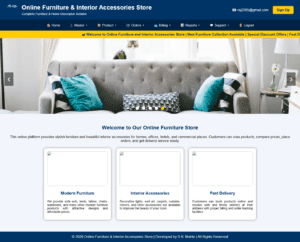
<!DOCTYPE html>
<html>
<head>
    <title>Online Furniture Dashboard</title>

    <style>
        body {
            margin: 0;
            font-family: Arial;
            background: #f2f6fc;
        }

        .header {
            background: #003366;
            color: white;
            padding: 18px 30px;
            display: flex;
            align-items: center;
            justify-content: space-between;
        }

        .logo-title {
            display: flex;
            align-items: center;
        }

        .logo-title img {
            width: 55px;
            height: 55px;
            margin-right: 15px;
            border-radius: 50%;
        }

        .main-title {
            font-size: 28px;
            font-weight: bold;
        }

        .sub-title {
            font-size: 14px;
            margin-top: 5px;
        }

        .header-right a {
            color: white;
            text-decoration: none;
            margin-left: 15px;
        }

        .signup-btn {
            background: #ffcc00;
            color: #003366 !important;
            padding: 10px 18px;
            border-radius: 5px;
            font-weight: bold;
        }

        .menu {
            background: #002244;
            text-align: center;
        }

        .menu ul {
            list-style: none;
            margin: 0;
            padding: 0;
        }

        .menu ul li {
            display: inline-block;
            position: relative;
        }

        .menu ul li a {
            display: block;
            color: white;
            padding: 15px 18px;
            text-decoration: none;
            font-size: 15px;
        }

        .menu ul li a:hover {
            background: #00509e;
        }

        .submenu {
            display: none;
            position: absolute;
            background: #003366;
            min-width: 220px;
            z-index: 1000;
            text-align: left;
        }

        .submenu li {
            display: block !important;
            position: relative;
        }

        .submenu li a {
            border-bottom: 1px solid #1b3d5c;
        }

        .menu li:hover > .submenu {
            display: block;
        }

        .subsubmenu {
            display: none;
            position: absolute;
            left: 220px;
            top: 0;
            background: #004080;
            min-width: 220px;
        }

        .submenu li:hover > .subsubmenu {
            display: block;
        }

        .marquee-box {
            height: 35px;
            background: #ffcc00;
            color: #003366;
            line-height: 35px;
            font-size: 16px;
            font-weight: bold;
        }

        .slider {
            width: 100%;
            height: 350px;
            position: relative;
            overflow: hidden;
            background: #ddd;
        }

        .slide {
            display: none;
            width: 100%;
            height: 350px;
        }

        .slide img {
            width: 100%;
            height: 350px;
            object-fit: cover;
        }

        .prev, .next {
            position: absolute;
            top: 45%;
            background: rgba(0,0,0,0.5);
            color: white;
            border: none;
            padding: 15px;
            font-size: 24px;
            cursor: pointer;
        }

        .prev {
            left: 20px;
        }

        .next {
            right: 20px;
        }

        .dots {
            position: absolute;
            bottom: 15px;
            width: 100%;
            text-align: center;
        }

        .dot {
            height: 15px;
            width: 15px;
            margin: 0 5px;
            background-color: white;
            border-radius: 50%;
            display: inline-block;
            cursor: pointer;
        }

        .active {
            background-color: #ffcc00;
        }

        .info-section {
            padding: 30px;
            text-align: center;
        }

        .info-section h2 {
            color: #003366;
        }

        .box-container {
            display: flex;
            justify-content: center;
            gap: 25px;
            flex-wrap: wrap;
            margin-top: 25px;
        }

        .box {
            width: 280px;
            background: white;
            border-radius: 10px;
            box-shadow: 0 0 10px gray;
            padding: 15px;
        }

        .box img {
            width: 100%;
            height: 160px;
            border-radius: 8px;
            object-fit: cover;
        }

        .box h3 {
            color: #003366;
        }

        .box p {
            text-align: justify;
            font-size: 14px;
        }

        .footer {
            background: #003366;
            color: white;
            text-align: center;
            padding: 15px;
            margin-top: 25px;
        }
    </style>
</head>

<body>

<div class="header">
    <div class="logo-title">
        <img src="image/logo.png" alt="Logo">

        <div>
            <div class="main-title">
                Online Furniture & Interior Accessories Store
            </div>

            <div class="sub-title">
                Complete Furniture & Home Decoration Solution
            </div>
        </div>
    </div>

    <div class="header-right">
        <a href="mailto:[email protected]">📧 [email protected]</a>
        <a href="signup.php" class="signup-btn">Sign Up</a>
    </div>
</div>

<div class="menu">
    <ul>
        <li><a href="home.php">🏠 Home</a></li>

        <li>
            <a href="#">👤 Master ▾</a>
            <ul class="submenu">
                <li><a href="customer.php">Customer Master</a></li>

                <li>
                    <a href="#">Furniture Master ▸</a>
                    <ul class="subsubmenu">
                        <li><a href="sofa.php">Sofa Details</a></li>
                        <li><a href="bed.php">Bed Details</a></li>
                        <li><a href="chair.php">Chair Details</a></li>
                    </ul>
                </li>

                <li><a href="accessories.php">Interior Accessories</a></li>
            </ul>
        </li>

        <li>
            <a href="#">📦 Product ▾</a>
            <ul class="submenu">
                <li><a href="stock.php">Stock Details</a></li>
                <li><a href="discount.php">Discount & Offer</a></li>
                <li><a href="search.php">Product Search</a></li>
            </ul>
        </li>

        <li>
            <a href="#">🛒 Orders ▾</a>
            <ul class="submenu">
                <li><a href="cart.php">Shopping Cart</a></li>
                <li><a href="order.php">Order Booking</a></li>
                <li><a href="delivery.php">Delivery & Shipping</a></li>
            </ul>
        </li>

        <li>
            <a href="#">💳 Billing ▾</a>
            <ul class="submenu">
                <li><a href="invoice.php">Invoice & Billing</a></li>
                <li><a href="payment.php">Payment Details</a></li>
            </ul>
        </li>

        <li>
            <a href="#">📊 Reports ▾</a>
            <ul class="submenu">
                <li><a href="customer_report.php">Customer Report</a></li>
                <li><a href="sales_report.php">Sales Report</a></li>
                <li><a href="stock_report.php">Stock Report</a></li>
            </ul>
        </li>

        <li>
            <a href="#">💬 Support ▾</a>
            <ul class="submenu">
                <li><a href="feedback.php">Feedback</a></li>
                <li><a href="complaint.php">Complaint</a></li>
                <li><a href="faq.php">FAQ</a></li>
            </ul>
        </li>

        <li><a href="logout.php">🚪 Logout</a></li>
    </ul>
</div>

<div class="marquee-box">
    <marquee scrollamount="6">
        🛋 Welcome to Online Furniture and Interior Accessories Store |
        New Furniture Collection Available |
        Special Discount Offers |
        Fast Delivery Service |
        Easy Online Shopping
    </marquee>
</div>

<div class="slider">
    <div class="slide">
        <img src="image/slider1.jpg">
    </div>

    <div class="slide">
        <img src="image/slider2.jpg">
    </div>

    <div class="slide">
        <img src="image/slider3.jpg">
    </div>

    <div class="slide">
        <img src="image/slider4.jpg">
    </div>

    <div class="slide">
        <img src="image/slider5.jpg">
    </div>

    <button class="prev" onclick="changeSlide(-1)">❮</button>
    <button class="next" onclick="changeSlide(1)">❯</button>

    <div class="dots">
        <span class="dot" onclick="currentSlide(1)"></span>
        <span class="dot" onclick="currentSlide(2)"></span>
        <span class="dot" onclick="currentSlide(3)"></span>
        <span class="dot" onclick="currentSlide(4)"></span>
        <span class="dot" onclick="currentSlide(5)"></span>
    </div>
</div>

<div class="info-section">
    <h2>Welcome to Our Online Furniture Store</h2>

    <p>
        This online platform provides stylish furniture and beautiful interior accessories
        for homes, offices, hotels, and commercial places. Customers can view products,
        compare prices, place orders, and get delivery service easily.
    </p>

    <div class="box-container">
        <div class="box">
            <img src="image/sofa.jpg">
            <h3>Modern Furniture</h3>
            <p>
                We provide sofa sets, beds, tables, chairs, wardrobes, and many other
                modern furniture products with attractive designs and affordable prices.
            </p>
        </div>

        <div class="box">
            <img src="image/decor.jpg">
            <h3>Interior Accessories</h3>
            <p>
                Decorative lights, wall art, carpets, curtains, mirrors, and other
                accessories are available to improve the beauty of your room.
            </p>
        </div>

        <div class="box">
            <img src="image/delivery.jpg">
            <h3>Fast Delivery</h3>
            <p>
                Customers can book products online and receive safe and timely delivery
                at their address with proper billing and order tracking facilities.
            </p>
        </div>
    </div>
</div>

<div class="footer">
    © <?php echo date("Y"); ?> Online Furniture & Interior Accessories Store |
    Developed by R.K. Mahto |
    All Rights Reserved
</div>

<script>
    var slideIndex = 0;
    var timer;

    showSlideAuto();

    function showSlideAuto() {
        var slides = document.getElementsByClassName("slide");
        var dots = document.getElementsByClassName("dot");

        for (var i = 0; i < slides.length; i++) {
            slides[i].style.display = "none";
        }

        slideIndex++;

        if (slideIndex > slides.length) {
            slideIndex = 1;
        }

        for (var j = 0; j < dots.length; j++) {
            dots[j].className = dots[j].className.replace(" active", "");
        }

        slides[slideIndex - 1].style.display = "block";
        dots[slideIndex - 1].className += " active";

        timer = setTimeout(showSlideAuto, 3000);
    }

    function changeSlide(n) {
        clearTimeout(timer);

        var slides = document.getElementsByClassName("slide");
        var dots = document.getElementsByClassName("dot");

        slideIndex = slideIndex + n;

        if (slideIndex > slides.length) {
            slideIndex = 1;
        }

        if (slideIndex < 1) {
            slideIndex = slides.length;
        }

        for (var i = 0; i < slides.length; i++) {
            slides[i].style.display = "none";
        }

        for (var j = 0; j < dots.length; j++) {
            dots[j].className = dots[j].className.replace(" active", "");
        }

        slides[slideIndex - 1].style.display = "block";
        dots[slideIndex - 1].className += " active";

        timer = setTimeout(showSlideAuto, 3000);
    }

    function currentSlide(n) {
        clearTimeout(timer);

        var slides = document.getElementsByClassName("slide");
        var dots = document.getElementsByClassName("dot");

        slideIndex = n;

        for (var i = 0; i < slides.length; i++) {
            slides[i].style.display = "none";
        }

        for (var j = 0; j < dots.length; j++) {
            dots[j].className = dots[j].className.replace(" active", "");
        }

        slides[slideIndex - 1].style.display = "block";
        dots[slideIndex - 1].className += " active";

        timer = setTimeout(showSlideAuto, 3000);
    }
</script>

</body>
</html> 
0 Comments