Example : A Datagrid View Print Report in VB .NET 2013.
Fig. Design Mode Report
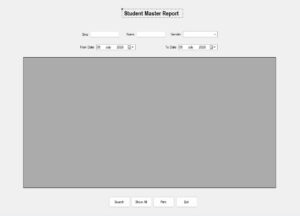
Fig. Run Mode Report
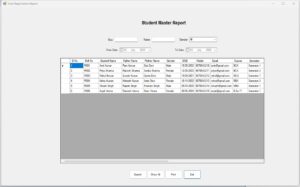
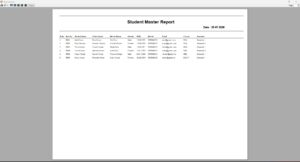
Fig. Final Mode Report after clicking the Print button
Imports System.Data.SqlClient
Imports System.Drawing.Printing


Public Class FrmStudentReport

    ' SQL Server Database Connection
    Dim con As New SqlConnection("Server=.;Database=StudentDB;Trusted_Connection=True")

    ' DataAdapter is used to retrieve records from database
    Dim da As SqlDataAdapter

   ' DataTable stores retrieved records temporarily
    Dim dt As DataTable

   ' PrintDocument object for printing the report
    Dim WithEvents printDoc As New PrintDocument

    ' Variable used for multi-page printing
    Dim rowIndex As Integer = 0


    Private Sub FrmStudentReport_Load(sender As Object, e As EventArgs) Handles MyBase.Load

        CmbGender.Items.Clear()
        CmbGender.Items.Add("All")
        CmbGender.Items.Add("Male")
        CmbGender.Items.Add("Female")
        CmbGender.Items.Add("Other")
        CmbGender.SelectedIndex = 0

        DtpFromDate.ShowCheckBox = True
        DtpToDate.ShowCheckBox = True
        DtpFromDate.Checked = False
        DtpToDate.Checked = False

        LoadAllRecords()

    End Sub


 'Function returns the SQL query used to retrieve Student records from database.
    Private Function GetSelectSql() As String
        Return "SELECT " &
               "Slno5 AS [Sl No], Rollno5 AS [Roll No], Sname5 AS [Student Name], " &
               "Fname5 AS [Father Name], Mname5 AS [Mother Name], Gender5 AS [Gender], " &
               "CONVERT(VARCHAR(10), Dob5, 105) AS [DOB], Mobile5 AS [Mobile], " &
               "Email5 AS [Email], Course5 AS [Course], Semester5 AS [Semester], " &
               "Address5 AS [Address], City5 AS [City], Pincode5 AS [Pincode], " &
               "Nationality5 AS [Nationality], Matric5 AS [Matric], Inter5 AS [Inter], " &
               "Graduation5 AS [Graduation], PostGraduation5 AS [Post Graduation], " &
               "OtherQualification5 AS [Other Qualification], Remarks5 AS [Remarks] " &
               "FROM StudentMaster "
    End Function


 'Procedure/Subroutine that Loads all Student records into DataGridView.
    Private Sub LoadAllRecords()
        Try
            da = New SqlDataAdapter(GetSelectSql() & " ORDER BY Slno5", con)
            dt = New DataTable()
            da.Fill(dt)

            DataGridView1.DataSource = dt
            DataGridView1.ReadOnly = True
            DataGridView1.AllowUserToAddRows = False
            DataGridView1.AllowUserToDeleteRows = False
            DataGridView1.AutoSizeColumnsMode = DataGridViewAutoSizeColumnsMode.AllCells

        Catch ex As Exception
            MessageBox.Show("Load Error: " & ex.Message)
        End Try
    End Sub


'Search Code that searches records using Serial Number, Student Name, Gender, and Date Between.
    Private Sub BtnSearch_Click(sender As Object, e As EventArgs) Handles BtnSearch.Click

        Try
            Dim sql As String = GetSelectSql() & " WHERE 1=1 "
            Dim cmd As New SqlCommand()
            cmd.Connection = con

            If TxtSlno.Text.Trim() <> "" Then
                sql &= " AND Slno5 = @Slno5 "
                cmd.Parameters.AddWithValue("@Slno5", CInt(TxtSlno.Text.Trim()))
            End If

            If TxtName.Text.Trim() <> "" Then
                sql &= " AND Sname5 LIKE @Sname5 "
                cmd.Parameters.AddWithValue("@Sname5", "%" & TxtName.Text.Trim() & "%")
            End If

            If CmbGender.Text.Trim() <> "" AndAlso CmbGender.Text <> "All" Then
                sql &= " AND Gender5 = @Gender5 "
                cmd.Parameters.AddWithValue("@Gender5", CmbGender.Text.Trim())
            End If

            If DtpFromDate.Checked AndAlso DtpToDate.Checked Then
                sql &= " AND CAST(Dob5 AS DATE) BETWEEN @FromDate AND @ToDate "
                cmd.Parameters.AddWithValue("@FromDate", DtpFromDate.Value.Date)
                cmd.Parameters.AddWithValue("@ToDate", DtpToDate.Value.Date)
            End If

            sql &= " ORDER BY Slno5"
            cmd.CommandText = sql

            da = New SqlDataAdapter(cmd)
            dt = New DataTable()
            da.Fill(dt)

            If dt.Rows.Count > 0 Then
                DataGridView1.DataSource = dt
            Else
                DataGridView1.DataSource = Nothing
                MessageBox.Show("No Record Found")
            End If

        Catch ex As Exception
            MessageBox.Show("Search Error: " & ex.Message)
        End Try

    End Sub


 'Clears search control boxes and reloads all records.
    Private Sub BtnShowAll_Click(sender As Object, e As EventArgs) Handles BtnShowAll.Click
        TxtSlno.Clear()
        TxtName.Clear()
        CmbGender.SelectedIndex = 0
        DtpFromDate.Checked = False
        DtpToDate.Checked = False

        LoadAllRecords()
    End Sub


'Opens Print Preview page in Landscape mode.
    Private Sub BtnPrint_Click(sender As Object, e As EventArgs) Handles BtnPrint.Click
        rowIndex = 0
        printDoc.DefaultPageSettings.Landscape = True
        printDoc.DefaultPageSettings.Margins = New Margins(40, 40, 40, 40)

        Dim ppd As New PrintPreviewDialog()
        ppd.Document = printDoc
        ppd.WindowState = FormWindowState.Maximized
        ppd.ShowDialog()
    End Sub


'Draws/prepares Report Header, Prints Column Headings, Prints Student Records, Handles Multiple Pages Automatically.
'This event code is not created from a any Button Click event. It is the PrintDocument's PrintPage event.
'This procedure event code simply created using copy-paste manually and is called automatically from 'BtnPrint_Click() code.

    Private Sub printDoc_PrintPage(sender As Object, e As PrintPageEventArgs) Handles printDoc.PrintPage

        Dim fTitle As New Font("Arial", 18, FontStyle.Bold)
        Dim fDate As New Font("Arial", 11, FontStyle.Bold)
        Dim fHead As New Font("Arial", 7, FontStyle.Bold)
        Dim fRow As New Font("Arial", 7)

        Dim x As Integer = 40
        Dim y As Integer = 40
        Dim rowHeight As Integer = 20

        e.Graphics.DrawLine(Pens.Black, 40, y, 1080, y)
        y += 20

        e.Graphics.DrawString("Student Master Report", fTitle, Brushes.Black, 420, y)
        y += 35

        e.Graphics.DrawString("Date : " & Date.Today.ToString("dd-MM-yyyy"), fDate, Brushes.Black, 850, y)
        y += 30

        e.Graphics.DrawLine(Pens.Black, 40, y, 1080, y)
        y += 25

        Dim colName() As String = {"Sl No", "Roll No", "Student Name", "Father Name", "Mother Name", "Gender", "DOB", "Mobile", "Email", "Course", "Semester"}
        Dim colWidth() As Integer = {35, 50, 100, 100, 100, 50, 65, 80, 120, 75, 60}

        Dim colX As Integer = x

        For i As Integer = 0 To colName.Length - 1
            e.Graphics.DrawString(colName(i), fHead, Brushes.Black, colX, y)
            colX += colWidth(i)
        Next

        y += rowHeight
        e.Graphics.DrawLine(Pens.Black, 40, y - 5, 1080, y - 5)

        While rowIndex < DataGridView1.Rows.Count

            If DataGridView1.Rows(rowIndex).IsNewRow = False Then
                colX = x

                For i As Integer = 0 To colName.Length - 1
                    Dim value As String = ""

                    If DataGridView1.Rows(rowIndex).Cells(colName(i)).Value IsNot Nothing Then
                        value = DataGridView1.Rows(rowIndex).Cells(colName(i)).Value.ToString()
                    End If

                    If value.Length > 15 Then
                        value = value.Substring(0, 15)
                    End If

                    e.Graphics.DrawString(value, fRow, Brushes.Black, colX, y)
                    colX += colWidth(i)
                Next

                y += rowHeight

                If y > e.MarginBounds.Bottom Then
                    rowIndex += 1
                    e.HasMorePages = True
                    Return
                End If
            End If

            rowIndex += 1
        End While

        e.HasMorePages = False

    End Sub


    Private Sub BtnExit_Click(sender As Object, e As EventArgs) Handles BtnExit.Click
        Me.Close()
    End Sub

End Class 
0 Comments