Table of Contents
hide
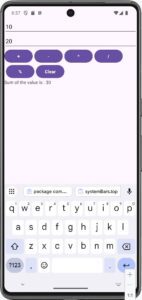
Example : An Android app for a simple calculator in a LinearLayout view.
strings.xml
<string-array name="Gen">
     <item>Male</item>
     <item>Female</item>
     <item>Other</item>
</string-array>


activity_main.xml


<?xml version="1.0" encoding="utf-8"?>
<LinearLayout xmlns:android="http://schemas.android.com/apk/res/android"
    xmlns:app="http://schemas.android.com/apk/res-auto"
    xmlns:tools="http://schemas.android.com/tools"
    android:layout_width="match_parent"
    android:layout_height="match_parent"
    android:orientation="vertical"
    android:id="@+id/main"
    tools:context=".MainActivity">

    <EditText
        android:id="@+id/editTextNumber1"
        android:layout_width="match_parent"
        android:layout_height="wrap_content"
        android:hint="Enter number 1" />

    <EditText
        android:id="@+id/editTextNumber2"
        android:layout_width="match_parent"
        android:layout_height="wrap_content"
        android:hint="Enter number 2" />

    <LinearLayout
        android:layout_width="wrap_content"
        android:layout_height="wrap_content"
        android:orientation="horizontal">

        <Button
            android:id="@+id/addButton"
            android:layout_width="wrap_content"
            android:layout_height="wrap_content"
            android:textStyle="bold"
            android:text="+" />

        <Button
            android:id="@+id/subButton"
            android:layout_width="wrap_content"
            android:layout_height="wrap_content"
            android:layout_marginLeft="05dp"
            android:textStyle="bold"
            android:text="-" />

        <Button
            android:id="@+id/multButton"
            android:layout_width="wrap_content"
            android:layout_height="wrap_content"
            android:layout_marginLeft="05dp"
            android:textStyle="bold"
            android:text="*" />

        <Button
            android:id="@+id/divButton"
            android:layout_width="wrap_content"
            android:layout_height="wrap_content"
            android:textStyle="bold"
            android:layout_marginLeft="05dp"
            android:text="/" />

    </LinearLayout>


    <LinearLayout
        android:layout_width="wrap_content"
        android:layout_height="wrap_content"
        android:orientation="horizontal">

        <Button
            android:id="@+id/moddivButton"
            android:layout_width="wrap_content"
            android:layout_height="wrap_content"
            android:layout_marginLeft="05dp"
            android:textStyle="bold"
            android:text="%" />

        <Button
            android:id="@+id/clearButton"
            android:layout_width="wrap_content"
            android:layout_height="wrap_content"
            android:layout_marginLeft="05dp"
            android:textStyle="bold"
            android:text="Clear" />
    </LinearLayout>

    <TextView
        android:id="@+id/resultTextView"
        android:layout_width="wrap_content"
        android:layout_height="wrap_content" />

</LinearLayout>


MainActivity.java

package com.example.myapplication2;

import android.os.Bundle;
import android.view.View;
import android.widget.Button;
import android.widget.EditText;
import android.widget.TextView;

import androidx.activity.EdgeToEdge;
import androidx.appcompat.app.AppCompatActivity;
import androidx.core.graphics.Insets;
import androidx.core.view.ViewCompat;
import androidx.core.view.WindowInsetsCompat;

public class MainActivity extends AppCompatActivity
{

    @Override
    protected void onCreate(Bundle savedInstanceState)
    {
        super.onCreate(savedInstanceState);
        EdgeToEdge.enable(this);
        setContentView(R.layout.activity_main);

        ViewCompat.setOnApplyWindowInsetsListener(findViewById(R.id.main), (v, insets) -> {
            Insets systemBars = insets.getInsets(WindowInsetsCompat.Type.systemBars());
            v.setPadding(systemBars.left, systemBars.top, systemBars.right, systemBars.bottom);
            return insets;
        });


        EditText editText1,editText2;
        Button addButton1,subButton1, multButton1, divButton1, moddivButton1,clearButton;
        TextView resultTextView;

        editText1 = findViewById(R.id.editTextNumber1);
        editText2 = findViewById(R.id.editTextNumber2);

        addButton1 = findViewById(R.id.addButton);
        subButton1 = findViewById(R.id.subButton);
        multButton1 = findViewById(R.id.multButton);
        divButton1 = findViewById(R.id.divButton);
        moddivButton1 = findViewById(R.id.moddivButton);

        clearButton=findViewById(R.id.clearButton);

        resultTextView = findViewById(R.id.resultTextView);

        editText1.requestFocus();      //Set cursor focus on Load event
        editText1.requestFocusFromTouch(); //Set cursor focus on Load event

        addButton1.setOnClickListener(new View.OnClickListener() {
            @Override
            public void onClick(View v) {
                int num1 = Integer.parseInt(editText1.getText().toString());
                int num2 = Integer.parseInt(editText2.getText().toString());
                int sum = num1 + num2;
                resultTextView.setText("Sum of the value is : " + sum);
            }
        });

        subButton1.setOnClickListener(new View.OnClickListener() {
            @Override
            public void onClick(View v) {
                int num1 = Integer.parseInt(editText1.getText().toString());
                int num2 = Integer.parseInt(editText2.getText().toString());
                int sub = num1 - num2;
                resultTextView.setText("Subtraction of the value is : " + sub);
            }
        });

        multButton1.setOnClickListener(new View.OnClickListener() {
            @Override
            public void onClick(View v) {
                int num1 = Integer.parseInt(editText1.getText().toString());
                int num2 = Integer.parseInt(editText2.getText().toString());
                int mult = num1 * num2;
                resultTextView.setText("Multiplication of the value is : " + mult);
            }
        });

        divButton1.setOnClickListener(new View.OnClickListener() {
            @Override
            public void onClick(View v) {
                int num1 = Integer.parseInt(editText1.getText().toString());
                int num2 = Integer.parseInt(editText2.getText().toString());
                int div = num1 / num2;
                resultTextView.setText("Division of the value is : " + div);
            }
        });

        moddivButton1.setOnClickListener(new View.OnClickListener() {
            @Override
            public void onClick(View v) {
                int num1 = Integer.parseInt(editText1.getText().toString());
                int num2 = Integer.parseInt(editText2.getText().toString());
                int mdiv = num1 % num2;
                resultTextView.setText("Modular Division of the value is : " + mdiv);
            }
        });

        clearButton.setOnClickListener(new View.OnClickListener() {
            @Override
            public void onClick(View v) {
                editText1.setText("");
                editText2.setText("");
                resultTextView.setText("  ");
                editText1.requestFocus();
            }
        });


    }
}
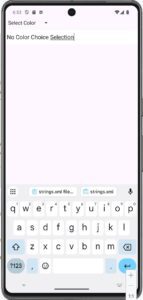
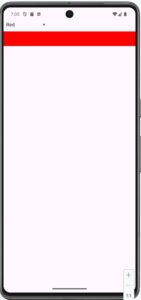
Example : Create an Activity in an Android App to display the selected Color in an EditText when a user selects a color name from a Spinner/Dropdown box using XML & Java in a LinearLayout View.
activity_main.xml


<?xml version="1.0" encoding="utf-8"?>
<LinearLayout xmlns:android="http://schemas.android.com/apk/res/android"
    xmlns:tools="http://schemas.android.com/tools"

    android:layout_width="match_parent"
    android:layout_height="match_parent"
    android:contentDescription="@string/app_name"
    android:orientation="vertical"
    tools:context=".MainActivity"

    android:padding="50dp"
    android:id="@+id/main">

    <Spinner
        android:id="@+id/spinner"
        android:layout_width="wrap_content"
        android:layout_height="wrap_content" />

    <EditText
        android:id="@+id/editText"
        android:layout_marginTop="10dp"
        android:layout_width="match_parent"
        android:layout_height="wrap_content"/>
</LinearLayout>


strings.xml


<string-array name="spinner_items">
    <item>Select Color</item>
    <item>Red</item>
    <item>Blue</item>
    <item>Green</item>
</string-array>


MainActivity.java


package com.example.myapplication2;

// Used for Activity state
import android.os.Bundle;

// Used for View controls
import android.view.View;

// Used for EditText
import android.widget.EditText;

// Used for Spinner
import android.widget.Spinner;

// Used to connect array data with Spinner
import android.widget.ArrayAdapter;

// Used to handle Spinner item selection
import android.widget.AdapterView;

// Used for predefined colors like RED, BLUE, GREEN
import android.graphics.Color;

// Required AndroidX classes
import androidx.activity.EdgeToEdge;
import androidx.appcompat.app.AppCompatActivity;
import androidx.core.graphics.Insets;
import androidx.core.view.ViewCompat;
import androidx.core.view.WindowInsetsCompat;


// Main Activity class
public class MainActivity extends AppCompatActivity
{

    // This method executes when the Activity starts
    @Override
    protected void onCreate(Bundle savedInstanceState)
    {
        // Calls the parent Activity onCreate() method
        super.onCreate(savedInstanceState);

        // Enables edge-to-edge screen display
        EdgeToEdge.enable(this);

        // Loads activity_main.xml layout
        setContentView(R.layout.activity_main);


        // Handles system bar spacing like status bar
        // and navigation bar
        ViewCompat.setOnApplyWindowInsetsListener(
                findViewById(R.id.main), (v, insets) -> {

                    // Gets the size of system bars
                    Insets systemBars =
                            insets.getInsets(
                                    WindowInsetsCompat.Type.systemBars()
                            );

                    // Adds padding so controls do not overlap system bars
                    v.setPadding(
                            systemBars.left,
                            systemBars.top,
                            systemBars.right,
                            systemBars.bottom
                    );

                    // Returns the insets
                    return insets;
                });


        // Creates an ArrayAdapter and gets Spinner items
        // from spinner_items array in strings.xml
        ArrayAdapter<CharSequence> spinnerAdapter =
                ArrayAdapter.createFromResource(
                        this,
                        R.array.spinner_items,
                        android.R.layout.simple_spinner_item
                );


        // Sets the layout of Spinner dropdown items
        spinnerAdapter.setDropDownViewResource(
                android.R.layout.simple_spinner_dropdown_item
        );


        // Connects Java Spinner object with XML Spinner
        Spinner spinner = findViewById(R.id.spinner);


        // Attaches the adapter to the Spinner
        spinner.setAdapter(spinnerAdapter);


        // Connects Java EditText object with XML EditText
        EditText editText = findViewById(R.id.editText);


        // Executes when an item is selected from Spinner
        spinner.setOnItemSelectedListener(
                new AdapterView.OnItemSelectedListener() {

                    // Executes when the user selects an item
                    @Override
                    public void onItemSelected(
                            AdapterView<?> parent,
                            View view,
                            int position,
                            long id) {

                        // Gets the selected Spinner item as String
                        String selectedItem =
                                parent.getItemAtPosition(position)
                                        .toString();


                        // Checks whether Red is selected
                        if ("Red".equals(selectedItem))
                        {
                            // Clears the EditText
                            editText.setText("");

                            // Changes EditText background to Red
                            editText.setBackgroundColor(Color.RED);
                        }


                        // Checks whether Blue is selected
                        else if ("Blue".equals(selectedItem))
                        {
                            // Clears the EditText
                            editText.setText("");

                            // Changes EditText background to Blue
                            editText.setBackgroundColor(Color.BLUE);
                        }


                        // Checks whether Green is selected
                        else if ("Green".equals(selectedItem))
                        {
                            // Clears the EditText
                            editText.setText("");

                            // Changes EditText background to Green
                            editText.setBackgroundColor(Color.GREEN);
                        }


                        // Executes when no matching color is selected
                        else
                        {
                            // Displays a message in EditText
                            editText.setText(
                                    "No Color Choice Selection"
                            );

                            // Changes EditText background to White
                            editText.setBackgroundColor(Color.WHITE);
                        }
                    }


                    // Executes when no Spinner item is selected
                    @Override
                    public void onNothingSelected(
                            AdapterView<?> parent)
                    {
                        // No action is required here
                    }

                });

    }   // End of onCreate()

}   // End of MainActivity class


NB : Here,
(i) ArrayAdapter, gets the color names from spinner_items in strings.xml.
(ii) spinner.setAdapter(), puts those items into the Spinner/Dropdown box.
(iii) setOnItemSelectedListener(), detects the selected Spinner item.
(iv) getItemAtPosition(position), gets the selected color name. if...else if checks whether the selected item is Red, Blue, or Green.
(v) setBackgroundColor(), changes/sets the background of the EditText.
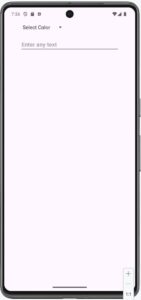
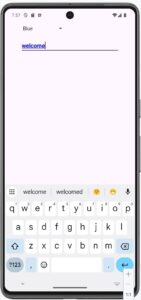
Example : Create an Activity in an Android App to display the Typed Text in the selected color in an EditText when a user selects a color name from a Spinner/Dropdown box using XML & Java in a LinearLayout View.
activity_main.xml

<?xml version="1.0" encoding="utf-8"?>
<LinearLayout xmlns:android="http://schemas.android.com/apk/res/android"
    xmlns:app="http://schemas.android.com/apk/res-auto"
    xmlns:tools="http://schemas.android.com/tools"

    android:layout_width="match_parent"
    android:layout_height="match_parent"
    android:contentDescription="@string/app_name"
    android:orientation="vertical"
    tools:context=".MainActivity"

    android:padding="50dp"
    android:id="@+id/main">

    <Spinner
        android:id="@+id/clrSpinner"
        android:layout_width="wrap_content"
        android:layout_height="wrap_content" />

    <EditText
        android:id="@+id/editText"
        android:layout_marginTop="20dp"
        android:layout_width="match_parent"
        android:layout_height="wrap_content"
        android:hint="Enter any text"
        android:textStyle="bold"/>

</LinearLayout>


strings.xml


<string-array name="spinner_items">
    <item>Select Color</item>
    <item>Red</item>
    <item>Blue</item>
    <item>Green</item>
</string-array>


MainActivity.java

package com.example.myapplication2;


// Used to store Activity state
import android.os.Bundle;


// Used for View objects
import android.view.View;

// Used for EditText control
import android.widget.EditText;

// Used for Spinner control
import android.widget.Spinner;

// Used to connect array data with Spinner
import android.widget.ArrayAdapter;

// Used to handle Spinner item selection
import android.widget.AdapterView;

// Used for colors such as RED, BLUE, GREEN and BLACK
import android.graphics.Color;


// Used for edge-to-edge screen display
import androidx.activity.EdgeToEdge;

// Base class for the Activity
import androidx.appcompat.app.AppCompatActivity;

// Used for system bar spacing
import androidx.core.graphics.Insets;

// Used for handling View compatibility
import androidx.core.view.ViewCompat;

// Used for handling system window insets
import androidx.core.view.WindowInsetsCompat;


// Main Activity class
public class MainActivity extends AppCompatActivity
{

    // This method executes when the Activity starts
    @Override
    protected void onCreate(Bundle savedInstanceState)
    {
        // Calls the parent class onCreate() method
        super.onCreate(savedInstanceState);


        // Enables edge-to-edge screen display
        EdgeToEdge.enable(this);


        // Loads activity_main.xml file on the screen
        setContentView(R.layout.activity_main);


        // Creates an ArrayAdapter and gets Spinner items
        // from spinner_items array of strings.xml
        ArrayAdapter<CharSequence> spinnerAdapter =
                ArrayAdapter.createFromResource(
                        this,
                        R.array.spinner_items,
                        android.R.layout.simple_spinner_item
                );


        // Sets the layout for the Spinner dropdown items
        spinnerAdapter.setDropDownViewResource(
                android.R.layout.simple_spinner_dropdown_item
        );


        // Connects Java Spinner object with clrSpinner of XML
        Spinner spinner = findViewById(R.id.clrSpinner);


        // Connects the ArrayAdapter with Spinner
        spinner.setAdapter(spinnerAdapter);


        // Connects Java EditText object with editText of XML
        EditText editText = findViewById(R.id.editText);


        // Executes when an item is selected from the Spinner
        spinner.setOnItemSelectedListener(
                new AdapterView.OnItemSelectedListener()
                {

                    // Executes when user selects an item
                    @Override
                    public void onItemSelected(
                            AdapterView<?> parent,
                            View view,
                            int position,
                            long id)
                    {

                        // Gets the selected Spinner item
                        // and converts it into String
                        String selectedItem =
                                parent.getItemAtPosition(position).toString();


                        // Checks whether Red is selected
                        if ("Red".equals(selectedItem))
                        {
                            // Changes EditText text color to Red
                            editText.setTextColor(Color.RED);
                        }


                        // Checks whether Blue is selected
                        else if ("Blue".equals(selectedItem))
                        {
                            // Changes EditText text color to Blue
                            editText.setTextColor(Color.BLUE);
                        }


                        // Checks whether Green is selected
                        else if ("Green".equals(selectedItem))
                        {
                            // Changes EditText text color to Green
                            editText.setTextColor(Color.GREEN);
                        }


                        // Executes if Red, Blue or Green is not selected
                        else
                        {
                            // Changes EditText text color to Black
                            editText.setTextColor(Color.BLACK);
                        }

                    }


                    // Executes when no Spinner item is selected
                    @Override
                    public void onNothingSelected(AdapterView<?> parent)
                    {
                        // No action is performed
                    }

                });


    }   // End of onCreate() method


}   // End of MainActivity class


NB : Here,
(i) ArrayAdapter, gets the color names from spinner_items in strings.xml.
(ii) spinner.setAdapter(), puts those items into the Spinner/Dropdown box.
(iii) setOnItemSelectedListener(), detects the selected Spinner item.
(iv) getItemAtPosition(position), gets the item selected by the user from the Spinner.
(v) setTextColor(), change/set the text color of the EditText.

0 Comments