Example : Multiple fields Report/Search code in JSP.
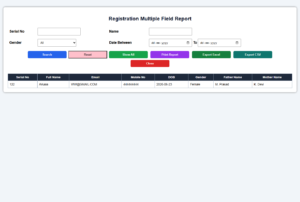
<%-- ================================================================
     File Name  : registration_report.jsp
     Table      : REGISTRATION
================================================================ --%>

<%@page contentType="text/html; charset=UTF-8" pageEncoding="UTF-8" import="java.sql.*"%>

<%
    /* ---------- Receive Search Values ---------- */
    String sino = request.getParameter("SINO1");
    String name = request.getParameter("NAME1");
    String gender = request.getParameter("GENDER1");
    String fromDate = request.getParameter("FROMDATE1");
    String toDate = request.getParameter("TODATE1");
    String sub = request.getParameter("SUB1");

    /* ---------- Avoid NullPointerException ---------- */
    if(sino == null) sino = "";
    if(name == null) name = "";
    if(gender == null) gender = "All";
    if(fromDate == null) fromDate = "";
    if(toDate == null) toDate = "";
%>

<!DOCTYPE html>
<html>
<head>
<title>Registration Report</title>

<style>
/* ---------- Page Design ---------- */
body{
    font-family:Arial;
    background:#f1f5f9;
}

/* ---------- Main Report Box ---------- */
.container{
    width:96%;
    margin:25px auto;
    background:white;
    padding:20px;
    border-radius:8px;
    box-shadow:0 0 8px gray;
}

/* ---------- Report Heading ---------- */
h2{
    text-align:center;
    color:#0f172a;
}

/* ---------- Table Design ---------- */
.filter-table,
.report-table{
    width:100%;
    border-collapse:collapse;
}

.filter-table td{
    padding:8px;
    font-weight:bold;
}

.report-table th,
.report-table td{
    border:1px solid #94a3b8;
    padding:8px;
    font-size:14px;
}

.report-table th{
    background:#1e293b;
    color:white;
}

/* ---------- Input Controls ---------- */
input, select{
    padding:8px;
    width:180px;
}

/* ---------- Button Common Design ---------- */
.btn{
    border:none;
    padding:9px 16px;
    color:white;
    font-weight:bold;
    cursor:pointer;
    border-radius:5px;
    margin:4px;
}

/* ---------- Different Button Colors ---------- */
.search{background:#2563eb;}
.show{background:#16a34a;}
.print{background:#9333ea;}
.excel{background:#15803d;}
.csv{background:#0f766e;}
.close{background:#dc2626;}

/* ---------- Print Setting ---------- */
@media print{
    .no-print{
        display:none;
    }

    body{
        background:white;
    }

    .container{
        box-shadow:none;
        width:100%;
        margin:0;
    }
}
</style>

<script>

/* ---------- Reset Report ---------- */
function resetForm()
{
    document.getElementsByName("SINO1")[0].value = "";
    document.getElementsByName("NAME1")[0].value = "";
    document.getElementsByName("GENDER1")[0].selectedIndex = 0;
    document.getElementsByName("FROMDATE1")[0].value = "";
    document.getElementsByName("TODATE1")[0].value = "";
}

/* ---------- Print Report ---------- */
function printReport()
{
    window.print();
}

/* ---------- Export Report to Excel ---------- */
function exportExcel()
{
    var table = document.getElementById("reportTable").outerHTML;
    var file = new Blob([table], {type:"application/vnd.ms-excel"});
    var url = URL.createObjectURL(file);

    var a = document.createElement("a");
    a.href = url;
    a.download = "Registration_Report.xls";
    a.click();
}

/* ---------- Export Report to CSV ---------- */
function exportCSV()
{
    var table = document.getElementById("reportTable");
    var rows = table.querySelectorAll("tr");
    var csv = "";

    for(var i=0; i<rows.length; i++)
    {
        var cols = rows[i].querySelectorAll("td, th");
        var row = [];

        for(var j=0; j<cols.length; j++)
        {
            row.push('"' + cols[j].innerText.replace(/"/g, '""') + '"');
        }

        csv += row.join(",") + "\n";
    }

    var file = new Blob([csv], {type:"text/csv"});
    var url = URL.createObjectURL(file);

    var a = document.createElement("a");
    a.href = url;
    a.download = "Registration_Report.csv";
    a.click();
}

/* ---------- Close Current Window ---------- */
function closePage()
{
    //window.close();

    if(confirm("Are you sure you want to close this page?"))
    {
        window.open('', '_self');
        window.close();
    }
}
</script>

</head>

<body>

<div class="container">

<h2>Registration Multiple Field Report</h2>

<!-- ---------- Search Filter Form ---------- -->
<form method="post" class="no-print">

<table class="filter-table">
<tr>
    <td>Serial No</td>
    <td>
        <input type="number" name="SINO1" value="<%=sino%>">
    </td>

    <td>Name</td>
    <td>
        <input type="text" name="NAME1" value="<%=name%>">
    </td>
</tr>

<tr>
    <td>Gender</td>
    <td>
        <select name="GENDER1">
            <option value="All" <%=gender.equals("All") ? "selected" : ""%>>All</option>
            <option value="Male" <%=gender.equals("Male") ? "selected" : ""%>>Male</option>
            <option value="Female" <%=gender.equals("Female") ? "selected" : ""%>>Female</option>
            <option value="Other" <%=gender.equals("Other") ? "selected" : ""%>>Other</option>
        </select>
    </td>

    <td>Date Between</td>
    <td>
        <input type="date" name="FROMDATE1" value="<%=fromDate%>">
        To
        <input type="date" name="TODATE1" value="<%=toDate%>">
    </td>
</tr>

<!-- ---------- Professional Report Buttons ---------- -->
<tr>
    <td colspan="4" align="center">
        <input type="submit" name="SUB1" value="Search" class="btn search">
        <input type="button" value="Reset" onclick="resetForm();" style="background-color: pink">
        <input type="submit" name="SUB1" value="Show All" class="btn show">

        <input type="button" value="Print Report" onclick="printReport();" class="btn print">
        <input type="button" value="Export Excel" onclick="exportExcel();" class="btn excel">
        <input type="button" value="Export CSV" onclick="exportCSV();" class="btn csv">
        <input type="button" value="Close" onclick="closePage();" class="btn close">
    </td>
</tr>
</table>

</form>

<br>

<!-- ---------- Report Table ---------- -->
<table class="report-table" id="reportTable">
<tr>
    <th>Serial No</th>
    <th>Full Name</th>
    <th>Email</th>
    <th>Mobile No</th>
    <th>DOB</th>
    <th>Gender</th>
    <th>Father Name</th>
    <th>Mother Name</th>
</tr>

<%
    Connection conn = null;
    PreparedStatement pst = null;
    ResultSet rs = null;

    try
    {
        /* ---------- Load Oracle JDBC Driver ---------- */
        Class.forName("oracle.jdbc.driver.OracleDriver");

        /* ---------- Create Oracle Database Connection ---------- */
        conn = DriverManager.getConnection(
            "jdbc:oracle:thin:@localhost:1521:orcl",
            "System",
            "raj"
        );

        /* ---------- Base Query ---------- */
        String sql = "SELECT SINO5, FULLN5, EML5, MBNO5, DOB5, GENDER5, FATHERN5, MOTHERN5 " +
                     "FROM REGISTRATION WHERE 1=1 ";

        /* ---------- Add Conditions Only When Search Button Clicked ---------- */
        if(sub != null && sub.equals("Search"))
        {
            if(!sino.equals(""))
            {
                sql += " AND SINO5 = ? ";
            }

            if(!name.equals(""))
            {
                sql += " AND UPPER(FULLN5) LIKE UPPER(?) ";
            }

            if(!gender.equals("All"))
            {
                sql += " AND GENDER5 = ? ";
            }

            if(!fromDate.equals("") && !toDate.equals(""))
            {
                sql += " AND TO_DATE(DOB5,'YYYY-MM-DD') BETWEEN TO_DATE(?,'YYYY-MM-DD') AND TO_DATE(?,'YYYY-MM-DD') ";
                // use this when DOB5 is in'DD-MM-YYYY' = sql += " AND TO_DATE(DOB5,'DD-MM-YYYY') BETWEEN TO_DATE(?,'DD-MM-YYYY') AND TO_DATE(?,'DD-MM-YYYY') ";
            }
        }

        /* ---------- Sorting ---------- */
        sql += " ORDER BY SINO5";

        pst = conn.prepareStatement(sql);

        int i = 1;

        /* ---------- Set PreparedStatement Values ---------- */
        if(sub != null && sub.equals("Search"))
        {
            if(!sino.equals(""))
            {
                pst.setString(i, sino);
                i++;
            }

            if(!name.equals(""))
            {
                pst.setString(i, "%" + name + "%");
                i++;
            }

            if(!gender.equals("All"))
            {
                pst.setString(i, gender);
                i++;
            }

            if(!fromDate.equals("") && !toDate.equals(""))
            {
                pst.setString(i, fromDate);
                i++;

                pst.setString(i, toDate);
                i++;
            }
        }

        /* ---------- Execute Report Query ---------- */
        rs = pst.executeQuery();

        boolean found = false;

        /* ---------- Display Records ---------- */
        while(rs.next())
        {
            found = true;
%>

<tr>
    <td><%=rs.getString("SINO5")%></td>
    <td><%=rs.getString("FULLN5")%></td>
    <td><%=rs.getString("EML5")%></td>
    <td><%=rs.getString("MBNO5")%></td>
    <td><%=rs.getString("DOB5")%></td>
    <td><%=rs.getString("GENDER5")%></td>
    <td><%=rs.getString("FATHERN5")%></td>
    <td><%=rs.getString("MOTHERN5")%></td>
</tr>

<%
        }

        /* ---------- If No Record Found ---------- */
        if(!found)
        {
%>

<tr>
    <td colspan="8" align="center" style="color:red;font-weight:bold;">
        No Record Found
    </td>
</tr>

<%
        }
    }
    catch(Exception e)
    {
%>

<tr>
    <td colspan="8" style="color:red;">
        Error: <%=e%>
    </td>
</tr>

<%
    }
    finally
    {
        /* ---------- Close Database Resources ---------- */
        try
        {
            if(rs != null) rs.close();
            if(pst != null) pst.close();
            if(conn != null) conn.close();
        }
        catch(Exception ex)
        {
        }
    }
%>

</table>

</div>

</body>
</html> 
0 Comments