Example : A complete (Left Side Panel Menu) Dashboard/Home Page code in JSP.
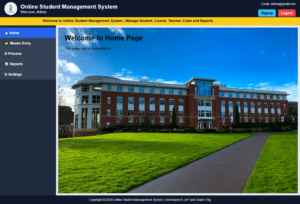
NB : Dashboard Home page appears after successful Login or Validation.
=================================  login.jsp  ====================================


<%@page contentType="text/html; charset=UTF-8" pageEncoding="UTF-8" import="java.sql.*"%>

<%
    /*----------------------------------------------------------
      Variable Declaration Section
      ----------------------------------------------------------*/

    // Variable to display login status message
    String msg = "";

    // Variables to store user name and password
    String uname = "";
    String pass = "";

    // Read username and password from login HTML form
    uname = request.getParameter("UNAME1");
    pass = request.getParameter("PASS1");

    // Read the clicked button value
    String sub = request.getParameter("SUB1");


    /*----------------------------------------------------------
      Login Authentication Section
      ----------------------------------------------------------*/

    // Check whether Login button is clicked
    if(sub != null && sub.equals("Login"))
    {
        Connection conn = null;
        PreparedStatement pst = null;
        ResultSet rs = null;

        try
        {
            // Load Oracle JDBC Driver
            Class.forName("oracle.jdbc.driver.OracleDriver");

            // Connect to Oracle Database
            conn = DriverManager.getConnection(
                "jdbc:oracle:thin:@localhost:1521:orcl",
                "System",
                "raj"
            );

            // SQL Query to verify user credentials
            pst = conn.prepareStatement(
                "SELECT * FROM UREG WHERE UNAME5=? AND PASSWORD5=?"
            );

            // Pass user entered values to SQL query
            pst.setString(1, uname);
            pst.setString(2, pass);

            // Execute SQL query
            rs = pst.executeQuery();


            /*--------------------------------------------------
              If login is successful
              --------------------------------------------------*/
            if(rs.next())
            {
                // Create user session
                session.setAttribute("LOGIN", "YES");
                session.setAttribute("USERNAME", uname);

                // Redirect to Dashboard page
                response.sendRedirect("dashboard.jsp");
                return;
            }
            else
            {
                // Display invalid login message
                msg = "Invalid Username or Password";
            }
        }
        catch(Exception e)
        {
            // Display database or program error
            msg = e.toString();
        }

    }
%>


<html>

<head>

<title>Login Page</title>

<style>

/*----------------------------------------------------------
    Page Background
----------------------------------------------------------*/
body{
    margin:0;
    padding:0;
    font-family:Arial;
    background:#e2e8f0;
}

/*----------------------------------------------------------
    Login Box Design
----------------------------------------------------------*/
.login-box{
    width:350px;
    margin:120px auto;
    background:white;
    padding:25px;
    border-radius:10px;
    box-shadow:0 0 10px gray;
}

/*----------------------------------------------------------
    Heading Style
----------------------------------------------------------*/
h2{
    text-align:center;
    color:#0f172a;
}

/*----------------------------------------------------------
    Text Box Design
----------------------------------------------------------*/
input[type=text],
input[type=password]{

    width:100%;
    padding:10px;
    margin-top:8px;
    margin-bottom:15px;
    border:1px solid #94a3b8;
    border-radius:5px;

}

/*----------------------------------------------------------
    Button Design
----------------------------------------------------------*/
input[type=submit],
input[type=reset]{

    width:48%;
    padding:10px;
    border:none;
    border-radius:5px;
    background:#2563eb;
    color:white;
    font-weight:bold;
    cursor:pointer;

}

/* Reset Button Color */
input[type=reset]{
    background:#64748b;
}

/*----------------------------------------------------------
    Message Label
----------------------------------------------------------*/
.msg{

    color:red;
    text-align:center;
    font-weight:bold;

}

</style>

</head>

<body>

<!--=========================================================
    Login Form Section
==========================================================-->

<div class="login-box">

<h2>Login</h2>

<!-- Display Login Message -->
<p class="msg"><%=msg%></p>

<!-- Login Form -->
<form method="post">

    <!-- User Name -->
    User Name
    <input type="text"
           name="UNAME1"
           required>

    <!-- Password -->
    Password
    <input type="password"
           name="PASS1"
           required>

    <!-- Login Button -->
    <input type="submit"
           name="SUB1"
           value="Login">

    <!-- Reset Button -->
    <input type="reset"
           value="Reset">

    <br><br>

    <!-- Forget Password Link -->
    <p align="center">
        <a href="forgetpassword.jsp">
            Forget Password?
        </a>
    </p>

</form>

</div>

</body>
</html>


======================================  dashboard.jsp  =======================================


<%-- ================================================================
     File Name  : dashboard.jsp
     Author     : Admin
================================================================ --%>

<%@page contentType="text/html; charset=UTF-8" pageEncoding="UTF-8"%>

<%
    /*---------------------------------------------------------------
      Session Checking Section
      If user is not logged in, redirect to login.jsp.
    ---------------------------------------------------------------*/

    String login = (String)session.getAttribute("LOGIN");
    String username = (String)session.getAttribute("USERNAME");

    if(login == null || !login.equals("YES"))
    {
        response.sendRedirect("login.jsp");
        return;
    }
%>

<!DOCTYPE html>
<html>
<head>

    <!-- Page title -->
    <title>Dashboard</title>

    <style>
        /*----------------------------------------------------------
          Common setting for all HTML elements
        ----------------------------------------------------------*/
        * {
            margin: 0;
            padding: 0;
            box-sizing: border-box;
            font-family: Arial;
        }

        /*----------------------------------------------------------
          Body background color
        ----------------------------------------------------------*/
        body {
            background: #f1f5f9;
        }

        /*----------------------------------------------------------
          Header section design
        ----------------------------------------------------------*/
        .header {
            height: 80px;
            background: #0f172a;
            color: white;
            display: flex;
            align-items: center;
            padding: 10px 20px;
        }

        /*----------------------------------------------------------
          Logo image design
        ----------------------------------------------------------*/
        .logo {
            width: 60px;
            height: 60px;
            margin-right: 15px;
            border-radius: 50%;
        }

        /*----------------------------------------------------------
          Project title area
        ----------------------------------------------------------*/
        .title {
            flex: 1;
        }

        .title h1 {
            font-size: 26px;
        }

        /*----------------------------------------------------------
          Right side header area: email, signup, logout
        ----------------------------------------------------------*/
        .header-right {
            text-align: right;
        }

        .header-right p {
            margin-bottom: 8px;
            font-size: 14px;
        }

        .header-right a {
            text-decoration: none;
            background: #38bdf8;
            color: black;
            padding: 8px 14px;
            margin-left: 5px;
            border-radius: 5px;
            font-weight: bold;
        }

        /*----------------------------------------------------------
          Logout button design
        ----------------------------------------------------------*/
        .header-right a.logout {
            background: #ef4444;
            color: white;
        }

        /*----------------------------------------------------------
          Marquee section design
        ----------------------------------------------------------*/
        .marquee {
            background: #facc15;
            color: #111827;
            padding: 8px;
            font-weight: bold;
        }

        /*----------------------------------------------------------
          Main body divided into sidebar and content area
        ----------------------------------------------------------*/
        .body {
            display: flex;
            min-height: calc(100vh - 150px);
        }

        /*----------------------------------------------------------
          Left side menu area
        ----------------------------------------------------------*/
        .sidebar {
            width: 260px;
            background: #1e293b;
            color: white;
            padding-top: 10px;
        }

        /*----------------------------------------------------------
          Main menu title design
        ----------------------------------------------------------*/
        .menu-title {
            padding: 13px 20px;
            cursor: pointer;
            background: #334155;
            border-bottom: 1px solid #475569;
            font-weight: bold;
        }

        .menu-title:hover {
            background: #475569;
        }

        .menu-title a {
            color: white;
            text-decoration: none;
            display: block;
        }

        /*----------------------------------------------------------
          Home menu design
        ----------------------------------------------------------*/
        .home-menu {
            background: #2563eb;
        }

        .home-menu:hover {
            background: #1d4ed8;
        }

        /*----------------------------------------------------------
          Submenu and sub-submenu hidden by default
        ----------------------------------------------------------*/
        .submenu, .subsubmenu {
            display: none;
            background: #0f172a;
        }

        /*----------------------------------------------------------
          Submenu link design
        ----------------------------------------------------------*/
        .submenu a {
            display: block;
            padding: 11px 35px;
            color: white;
            text-decoration: none;
            border-bottom: 1px solid #1e293b;
            font-size: 14px;
        }

        .submenu a:hover {
            background: #2563eb;
        }

        /*----------------------------------------------------------
          Submenu title design for sub-submenu
        ----------------------------------------------------------*/
        .submenu-title {
            padding: 11px 35px;
            cursor: pointer;
            background: #111827;
            border-bottom: 1px solid #1e293b;
            font-size: 14px;
        }

        .submenu-title:hover {
            background: #2563eb;
        }

        /*----------------------------------------------------------
          Sub-submenu link design
        ----------------------------------------------------------*/
        .subsubmenu a {
            padding-left: 55px;
            background: #020617;
        }

        /*----------------------------------------------------------
          Right side content area
        ----------------------------------------------------------*/
        .content {
            flex: 1;
            padding: 10px;
            background: #e2e8f0;
        }

        /*----------------------------------------------------------
          iframe design
          All menu pages open inside this iframe.
        ----------------------------------------------------------*/
        iframe {
            width: 100%;
            height: 100%;
            min-height: 620px;
            border: none;
            background: #E8F5E9;
        }

        /*----------------------------------------------------------
          Footer section design
        ----------------------------------------------------------*/
        .footer {
            height: 40px;
            background: #0f172a;
            color: white;
            text-align: center;
            line-height: 40px;
            font-size: 14px;
        }
    </style>

    <script>
        /*----------------------------------------------------------
          Function Name : toggleMenu
          Purpose       : To show and hide submenu/sub-submenu.
        ----------------------------------------------------------*/
        function toggleMenu(id) {
            var menu = document.getElementById(id);

            if (menu.style.display === "block") {
                menu.style.display = "none";
            } else {
                menu.style.display = "block";
            }
        }

        /*----------------------------------------------------------
          Function Name : logoutConfirm
          Purpose       : To confirm before logout.
        ----------------------------------------------------------*/
        function logoutConfirm() {
            return confirm("Are you sure you want to logout?");
        }
    </script>

</head>

<body>

<!-- ==============================================================
     Header Section
     Contains logo, project title, username, email, signup, logout
================================================================ -->
<div class="header">

    <!-- Project logo -->
    <img src="images/logo.png" class="logo">

    <!-- Project title and logged-in username -->
    <div class="title">
        <h1>Online Student Management System</h1>
        <p>Welcome, <%=username%></p>
    </div>

    <!-- Header right side links -->
    <div class="header-right">
        <p>Email: [email protected]</p>

        <!-- Signup page opens in iframe -->
        <a href="signup.jsp" target="mainFrame">Signup</a>

        <!-- Logout page opens after confirmation -->
        <a href="logout.jsp" class="logout" onclick="return logoutConfirm();">
            Logout
        </a>
    </div>

</div>

<!-- ==============================================================
     Marquee Section
================================================================ -->
<div class="marquee">
    <marquee behavior="scroll" direction="left">
        Welcome to Online Student Management System | Manage Student, Course, Teacher, Exam and Reports
    </marquee>
</div>

<!-- ==============================================================
     Dashboard Body Section
     Contains left menu and right iframe area
================================================================ -->
<div class="body">

    <!-- ==========================================================
         Left Sidebar Menu Section
    =========================================================== -->
    <div class="sidebar">

        <!-- Home menu -->
        <div class="menu-title home-menu">
            <a href="home.jsp" target="mainFrame">🏠 Home</a>
        </div>

        <!-- Master Entry main menu -->
        <div class="menu-title" onclick="toggleMenu('masterMenu')">
            📂 Master Entry
        </div>

        <!-- Master Entry submenu -->
        <div class="submenu" id="masterMenu">

            <!-- Student Master page -->
            <a href="student.jsp" target="mainFrame">Student Master</a>

            <!-- Course Master page -->
            <a href="course.jsp" target="mainFrame">Course Master</a>

            <!-- Teacher Master page -->
            <a href="teacher.jsp" target="mainFrame">Teacher Master</a>

            <!-- Subject Master sub-submenu title -->
            <div class="submenu-title" onclick="toggleMenu('subjectSubMenu')">
                Subject Master +
            </div>

            <!-- Subject Master sub-submenu -->
            <div class="subsubmenu" id="subjectSubMenu">
                <a href="subject.jsp" target="mainFrame">Add Subject</a>
                <a href="subject_report.jsp" target="mainFrame">Subject Report</a>
            </div>

        </div>

        <!-- Process main menu -->
        <div class="menu-title" onclick="toggleMenu('processMenu')">
            ⚙ Process
        </div>

        <!-- Process submenu -->
        <div class="submenu" id="processMenu">
            <a href="admission.jsp" target="mainFrame">Admission</a>
            <a href="fee.jsp" target="mainFrame">Fee Payment</a>
            <a href="marks.jsp" target="mainFrame">Marks Entry</a>
        </div>

        <!-- Reports main menu -->
        <div class="menu-title" onclick="toggleMenu('reportMenu')">
            📊 Reports
        </div>

        <!-- Reports submenu -->
        <div class="submenu" id="reportMenu">
            <a href="student_report.jsp" target="mainFrame">Student Report</a>
            <a href="course_report.jsp" target="mainFrame">Course Report</a>
            <a href="marks_report.jsp" target="mainFrame">Marks Report</a>

            <!-- Admin Reports sub-submenu title -->
            <div class="submenu-title" onclick="toggleMenu('adminReportSub')">
                Admin Reports +
            </div>

            <!-- Admin Reports sub-submenu -->
            <div class="subsubmenu" id="adminReportSub">
                <a href="user_report.jsp" target="mainFrame">User Report</a>
                <a href="login_report.jsp" target="mainFrame">Login Report</a>
            </div>
        </div>

        <!-- Settings main menu -->
        <div class="menu-title" onclick="toggleMenu('settingMenu')">
            ⚙ Settings
        </div>

        <!-- Settings submenu -->
        <div class="submenu" id="settingMenu">
            <a href="change_password.jsp" target="mainFrame">Change Password</a>
            <a href="profile.jsp" target="mainFrame">Profile</a>
        </div>

    </div>

    <!-- ==========================================================
         Right Content Area
         All pages open inside iframe named mainFrame
    =========================================================== -->
    <div class="content">
        <iframe src="home.jsp" name="mainFrame"></iframe>
    </div>

</div>

<!-- ==============================================================
     Footer Section
================================================================ -->
<div class="footer">
    Copyright © 2026 Online Student Management System | Developed in JSP and Oracle 10g
</div>

</body>
</html>


=================================  home.jsp  ====================================


<%@page contentType="text/html; charset=UTF-8" pageEncoding="UTF-8" import="java.sql.*"%>

<html>
    <head>
        <title>Home</title>

        <style>
/*            body{
                margin:0;
                background:#E8F5E9;
                font-family:Arial;
            }*/

            body{
                margin:0;
                background-image:url('images/background.jpg');
                background-repeat:no-repeat;
                background-size:cover;
                background-position:center;
                background-attachment:fixed;
            }

        </style>
    </head>
    <body style="font-family:Arial; padding:30px;">
        <h1>Welcome to Home Page</h1>
        <p>This page opens inside iframe.</p>
    </body>
</html>


=================================  logout.jsp  ====================================


<%
session.invalidate();
response.sendRedirect("login.jsp");
%>
Example : A complete (Top Menu without Sliders) Dashboard/Home Page code in JSP.
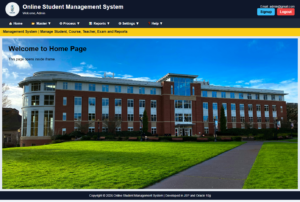
NB : Dashboard Home page appears after successful Login or Validation.
=========================================  login.jsp  ==========================================


<%@page contentType="text/html; charset=UTF-8" pageEncoding="UTF-8" import="java.sql.*"%>

<%
    /*----------------------------------------------------------
      Variable Declaration Section
      ----------------------------------------------------------*/

    // Variable to display login status message
    String msg = "";

    // Variables to store user name and password
    String uname = "";
    String pass = "";

    // Read username and password from login HTML form
    uname = request.getParameter("UNAME1");
    pass = request.getParameter("PASS1");

    // Read the clicked button value
    String sub = request.getParameter("SUB1");


    /*----------------------------------------------------------
      Login Authentication Section
      ----------------------------------------------------------*/

    // Check whether Login button is clicked
    if(sub != null && sub.equals("Login"))
    {
        Connection conn = null;
        PreparedStatement pst = null;
        ResultSet rs = null;

        try
        {
            // Load Oracle JDBC Driver
            Class.forName("oracle.jdbc.driver.OracleDriver");

            // Connect to Oracle Database
            conn = DriverManager.getConnection(
                "jdbc:oracle:thin:@localhost:1521:orcl",
                "System",
                "raj"
            );

            // SQL Query to verify user credentials
            pst = conn.prepareStatement(
                "SELECT * FROM UREG WHERE UNAME5=? AND PASSWORD5=?"
            );

            // Pass user entered values to SQL query
            pst.setString(1, uname);
            pst.setString(2, pass);

            // Execute SQL query
            rs = pst.executeQuery();


            /*--------------------------------------------------
              If login is successful
              --------------------------------------------------*/
            if(rs.next())
            {
                // Create user session
                session.setAttribute("LOGIN", "YES");
                session.setAttribute("USERNAME", uname);

                // Redirect to Dashboard page
                response.sendRedirect("dashboard.jsp");
                return;
            }
            else
            {
                // Display invalid login message
                msg = "Invalid Username or Password";
            }
        }
        catch(Exception e)
        {
            // Display database or program error
            msg = e.toString();
        }

    }
%>


<html>

<head>

<title>Login Page</title>

<style>

/*----------------------------------------------------------
    Page Background
----------------------------------------------------------*/
body{
    margin:0;
    padding:0;
    font-family:Arial;
    background:#e2e8f0;
}

/*----------------------------------------------------------
    Login Box Design
----------------------------------------------------------*/
.login-box{
    width:350px;
    margin:120px auto;
    background:white;
    padding:25px;
    border-radius:10px;
    box-shadow:0 0 10px gray;
}

/*----------------------------------------------------------
    Heading Style
----------------------------------------------------------*/
h2{
    text-align:center;
    color:#0f172a;
}

/*----------------------------------------------------------
    Text Box Design
----------------------------------------------------------*/
input[type=text],
input[type=password]{

    width:100%;
    padding:10px;
    margin-top:8px;
    margin-bottom:15px;
    border:1px solid #94a3b8;
    border-radius:5px;

}

/*----------------------------------------------------------
    Button Design
----------------------------------------------------------*/
input[type=submit],
input[type=reset]{

    width:48%;
    padding:10px;
    border:none;
    border-radius:5px;
    background:#2563eb;
    color:white;
    font-weight:bold;
    cursor:pointer;

}

/* Reset Button Color */
input[type=reset]{
    background:#64748b;
}

/*----------------------------------------------------------
    Message Label
----------------------------------------------------------*/
.msg{

    color:red;
    text-align:center;
    font-weight:bold;

}

</style>

</head>

<body>

<!--=========================================================
    Login Form Section
==========================================================-->

<div class="login-box">

<h2>Login</h2>

<!-- Display Login Message -->
<p class="msg"><%=msg%></p>

<!-- Login Form -->
<form method="post">

    <!-- User Name -->
    User Name
    <input type="text"
           name="UNAME1"
           required>

    <!-- Password -->
    Password
    <input type="password"
           name="PASS1"
           required>

    <!-- Login Button -->
    <input type="submit"
           name="SUB1"
           value="Login">

    <!-- Reset Button -->
    <input type="reset"
           value="Reset">

    <br><br>

    <!-- Forget Password Link -->
    <p align="center">
        <a href="forgetpassword.jsp">
            Forget Password?
        </a>
    </p>

</form>

</div>

</body>
</html>


=========================================  dashboard.jsp  ==========================================

<%-- ================================================================
     File Name  : dashboard.jsp
     Author     : Admin
================================================================ --%>

<%@page contentType="text/html; charset=UTF-8" pageEncoding="UTF-8"%>

<%
    // ---------------- Session Checking ----------------
    String login = (String)session.getAttribute("LOGIN");
    String username = (String)session.getAttribute("USERNAME");

    if(login == null || !login.equals("YES"))
    {
        response.sendRedirect("login.jsp");
        return;
    }
%>

<!DOCTYPE html>
<html>
<head>
    <title>Dashboard</title>

    <style>
        /* ---------------- Common Page Setting ---------------- */
        *{
            margin:0;
            padding:0;
            box-sizing:border-box;
            font-family:Arial;
        }

        body{
            background:#f1f5f9;
        }

        /* ---------------- Header Section ---------------- */
        .header{
            height:85px;
            background:#0f172a;
            color:white;
            display:flex;
            align-items:center;
            padding:10px 25px;
        }

        .logo{
            width:65px;
            height:65px;
            border-radius:50%;
            margin-right:15px;
        }

        .title{
            flex:1;
        }

        .title h1{
            font-size:27px;
        }

        .title p{
            margin-top:5px;
            font-size:14px;
        }

        .header-right{
            text-align:right;
        }

        .header-right p{
            margin-bottom:8px;
            font-size:14px;
        }

        .header-right a{
            text-decoration:none;
            padding:8px 14px;
            margin-left:5px;
            border-radius:5px;
            font-weight:bold;
            background:#38bdf8;
            color:black;
        }

        .header-right a.logout{
            background:#ef4444;
            color:white;
        }

        /* ---------------- Top Menu Bar ---------------- */
        .top-menu{
            background:#1e293b;
            height:45px;
            display:flex;
            align-items:center;
            padding-left:20px;
            z-index:1000;
            position:relative;
        }

        .top-menu ul{
            list-style:none;
        }

        .top-menu ul li{
            float:left;
            position:relative;
        }

        .top-menu ul li a{
            display:block;
            color:white;
            text-decoration:none;
            padding:14px 20px;
            font-size:15px;
            font-weight:bold;
        }

        .top-menu ul li a:hover{
            background:#2563eb;
        }

        /* ---------------- Dropdown Menu ---------------- */
        .top-menu ul li ul{
            display:none;
            position:absolute;
            top:45px;
            left:0;
            background:#0f172a;
            min-width:210px;
            z-index:999;
        }

        .top-menu ul li:hover > ul{
            display:block;
        }

        .top-menu ul li ul li{
            width:100%;
            float:none;
            border-bottom:1px solid #334155;
        }

        .top-menu ul li ul li a{
            padding:12px 18px;
            font-size:14px;
            font-weight:normal;
        }

        /* ---------------- Sub-submenu ---------------- */
        .top-menu ul li ul li ul{
            display:none;
            position:absolute;
            top:0;
            left:210px;
            background:#020617;
            min-width:200px;
        }

        .top-menu ul li ul li:hover > ul{
            display:block;
        }

        /* ---------------- Marquee Section ---------------- */
        .marquee{
            background:#facc15;
            color:#111827;
            padding:8px;
            font-weight:bold;
        }

        /* ---------------- Content Section ---------------- */
        .content{
            padding:10px;
            background:#e2e8f0;
            height:calc(100vh - 218px);
        }

        iframe{
            width:100%;
            height:100%;
            border:none;
            display:block;
            background:#E8F5E9;
        }

        /* ---------------- Footer Section ---------------- */
        .footer{
            height:40px;
            background:#0f172a;
            color:white;
            text-align:center;
            line-height:40px;
            font-size:14px;
        }

        /* ---------------- Clear Float ---------------- */
        .top-menu::after{
            content:"";
            display:block;
            clear:both;
        }
    </style>

    <script>
        // ---------------- Logout Confirmation ----------------
        function logoutConfirm()
        {
            return confirm("Are you sure you want to logout?");
        }
    </script>
</head>

<body>

<!-- ================= Header Section ================= -->
<div class="header">

    <!-- Project Logo -->
    <img src="images/logo.png" class="logo">

    <!-- Project Title -->
    <div class="title">
        <h1>Online Student Management System</h1>
        <p>Welcome, <%=username%></p>
    </div>

    <!-- Header Right Side -->
    <div class="header-right">
        <p>Email: [email protected]</p>

        <a href="signup.jsp" target="mainFrame">Signup</a>

        <a href="logout.jsp"
           class="logout"
           onclick="return logoutConfirm();">
           Logout
        </a>
    </div>

</div>

<!-- ================= Top Menu Section ================= -->
<div class="top-menu">

    <ul>

        <!-- Home Menu -->
        <li>
            <a href="home.jsp" target="mainFrame">🏠 Home</a>
        </li>

        <!-- Master Menu -->
        <li>
            <a href="#">📂 Master ▼</a>

            <ul>
                <li>
                    <a href="student.jsp" target="mainFrame">Student Master</a>
                </li>

                <li>
                    <a href="course.jsp" target="mainFrame">Course Master</a>
                </li>

                <li>
                    <a href="teacher.jsp" target="mainFrame">Teacher Master</a>
                </li>

                <li>
                    <a href="#">Subject Master ▶</a>

                    <ul>
                        <li>
                            <a href="subject.jsp" target="mainFrame">Add Subject</a>
                        </li>

                        <li>
                            <a href="subject_report.jsp" target="mainFrame">Subject Report</a>
                        </li>
                    </ul>
                </li>
            </ul>
        </li>

        <!-- Process Menu -->
        <li>
            <a href="#">⚙ Process ▼</a>

            <ul>
                <li>
                    <a href="admission.jsp" target="mainFrame">Admission</a>
                </li>

                <li>
                    <a href="fee.jsp" target="mainFrame">Fee Payment</a>
                </li>

                <li>
                    <a href="marks.jsp" target="mainFrame">Marks Entry</a>
                </li>
            </ul>
        </li>

        <!-- Reports Menu -->
        <li>
            <a href="#">📊 Reports ▼</a>

            <ul>
                <li>
                    <a href="student_report.jsp" target="mainFrame">Student Report</a>
                </li>

                <li>
                    <a href="course_report.jsp" target="mainFrame">Course Report</a>
                </li>

                <li>
                    <a href="marks_report.jsp" target="mainFrame">Marks Report</a>
                </li>

                <li>
                    <a href="#">Admin Reports ▶</a>

                    <ul>
                        <li>
                            <a href="user_report.jsp" target="mainFrame">User Report</a>
                        </li>

                        <li>
                            <a href="login_report.jsp" target="mainFrame">Login Report</a>
                        </li>
                    </ul>
                </li>
            </ul>
        </li>

        <!-- Settings Menu -->
        <li>
            <a href="#">⚙ Settings ▼</a>

            <ul>
                <li>
                    <a href="changepassword.jsp" target="mainFrame">Change Password</a>
                </li>

                <li>
                    <a href="profile.jsp" target="mainFrame">Profile</a>
                </li>
            </ul>
        </li>

        <!-- Help Menu -->
        <li>
            <a href="#">❓ Help ▼</a>

            <ul>
                <li>
                    <a href="about.jsp" target="mainFrame">About</a>
                </li>

                <li>
                    <a href="contact.jsp" target="mainFrame">Contact</a>
                </li>

                <li>
                    <a href="feedback.jsp" target="mainFrame">Feedback</a>
                </li>
            </ul>
        </li>

    </ul>

</div>

<!-- ================= Marquee Section ================= -->
<div class="marquee">
    <marquee behavior="scroll" direction="left">
        Welcome to Online Student Management System | Manage Student, Course, Teacher, Exam and Reports
    </marquee>
</div>

<!-- ================= Main Content Section ================= -->
<div class="content">

    <!-- All menu pages open inside this iframe -->
    <iframe src="home.jsp" name="mainFrame"></iframe>

</div>

<!-- ================= Footer Section ================= -->
<div class="footer">
    Copyright © 2026 Online Student Management System | Developed in JSP and Oracle 10g
</div>

</body>
</html>


=========================================  home.jsp  ==========================================

<%--
    Document   : Home
    Created on : 27 Jun, 2026, 12:12:58 PM
    Author     : rajes
--%>

<%@page contentType="text/html; charset=UTF-8" pageEncoding="UTF-8" import="java.sql.*"%>

<html>
    <head>
        <title>Home</title>

        <style>
/*            body{
                margin:0;
                background:#E8F5E9;
                font-family:Arial;
            }*/

/*            body{
                margin:0;
                padding:0;
                background:url("images/background.jpg") no-repeat center center fixed;
                background-size:cover;
            }*/

        </style>
    </head>
    <body style="font-family:Arial; padding:30px;">
        <h1>Welcome to Home Page</h1>
        <p>This page opens inside iframe.</p>
    </body>
</html>

=========================================  logout.jsp  ==========================================


<%
session.invalidate();
response.sendRedirect("login.jsp");
%>
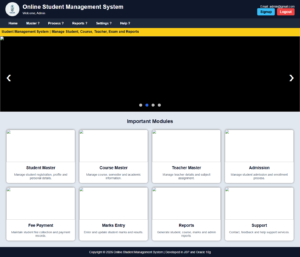
Example : A complete (Top Menu with Sliders and Open a page in a new Window) Dashboard/Home Page code in JSP.
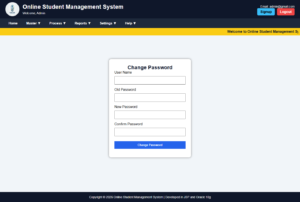
Page after opening a new page :
NB: * Dashboard page opens after successful Login validation.
** Each connected separate page in the dashboard must include CSS and settings, like the ‘changepassword’ page below, to open in a new window with menu and footer.
-------------------------------------------- login.jsp ------------------------------------------
<%@page contentType="text/html; charset=UTF-8" pageEncoding="UTF-8" import="java.sql.*"%>
<%
String msg = "";
String uname="";
String pass="";
uname = request.getParameter("UNAME1");
pass = request.getParameter("PASS1");
String sub = request.getParameter("SUB1");
if(sub != null && sub.equals("Login"))
{
Connection conn = null;
PreparedStatement pst = null;
ResultSet rs = null;
try
{
Class.forName("oracle.jdbc.driver.OracleDriver");
conn = DriverManager.getConnection(
"jdbc:oracle:thin:@localhost:1521:orcl",
"System",
"raj"
);
pst = conn.prepareStatement(
"SELECT * FROM UREG WHERE UNAME5=? AND PASSWORD5=?"
);
pst.setString(1, uname);
pst.setString(2, pass);
rs = pst.executeQuery();
if(rs.next())
{
session.setAttribute("LOGIN", "YES");
session.setAttribute("USERNAME", uname);
response.sendRedirect("dashboard.jsp");
return;
}
else
{
msg = "Invalid Username or Password";
// out.println("<script>");
// out.println("alert('Invalid User Name or Password');");
// out.println("location='login.jsp';");
// out.println("</script>");
}
}
catch(Exception e)
{
msg = e.toString();
}
}
%>
<html>
<head>
<title>Login Page</title>
<style>
body{
margin:0;
padding:0;
font-family:Arial;
background:#e2e8f0;
}
.login-box{
width:350px;
margin:120px auto;
background:white;
padding:25px;
border-radius:10px;
box-shadow:0 0 10px gray;
}
h2{
text-align:center;
color:#0f172a;
}
input[type=text],
input[type=password]{
width:100%;
padding:10px;
margin-top:8px;
margin-bottom:15px;
border:1px solid #94a3b8;
border-radius:5px;
}
input[type=submit],
input[type=reset]{
width:48%;
padding:10px;
border:none;
border-radius:5px;
background:#2563eb;
color:white;
font-weight:bold;
cursor:pointer;
}
input[type=reset]{
background:#64748b;
}
.msg{
color:red;
text-align:center;
font-weight:bold;
}
</style>
</head>
<body>
<div class="login-box">
<h2>Login</h2>
<p class="msg"><%=msg%></p>
<form method="post">
User Name
<input type="text" name="UNAME1" required>
Password
<input type="password" name="PASS1" required>
<input type="submit" name="SUB1" value="Login">
<input type="reset" value="Reset">
<p align="center">
<a href="forgetpassword.jsp">Forget Password?</a>
</p>
</form>
</div>
</body>
</html>
-------------------------------------------- header.jsp ------------------------------------------
<div class="header">
<!-- Project Logo -->
<img src="images/logo.png" class="logo">
<!-- Project Title -->
<div class="title">
<h1>Online Student Management System</h1>
<p>Welcome, <%=session.getAttribute("USERNAME")%></p>
</div>
<!-- Header Right Links -->
<div class="header-right">
<p>Email: [email protected]</p>
<!-- Signup opens in new window -->
<a href="signup.jsp" target="_blank">Signup</a>
<!-- Logout with confirmation -->
<a href="logout.jsp" class="logout" onclick="return logoutConfirm();">
Logout
</a>
</div>
</div>
-------------------------------------------- menu.jsp ------------------------------------------
<div class="top-menu">
<ul>
<!-- Home Menu -->
<li>
<a href="dashboard.jsp">Home</a>
</li>
<!-- Master Menu -->
<li>
<a href="#">Master ▼</a>
<ul>
<li>
<a href="student.jsp" target="_blank">Student Master</a>
</li>
<li>
<a href="course.jsp" target="_blank">Course Master</a>
</li>
<li>
<a href="teacher.jsp" target="_blank">Teacher Master</a>
</li>
<!-- Subject Master Sub-submenu -->
<li>
<a href="#">Subject Master ▶</a>
<ul>
<li>
<a href="subject.jsp" target="_blank">Add Subject</a>
</li>
<li>
<a href="subject_report.jsp" target="_blank">Subject Report</a>
</li>
</ul>
</li>
</ul>
</li>
<!-- Process Menu -->
<li>
<a href="#">Process ▼</a>
<ul>
<li>
<a href="admission.jsp" target="_blank">Admission</a>
</li>
<li>
<a href="fee.jsp" target="_blank">Fee Payment</a>
</li>
<li>
<a href="marks.jsp" target="_blank">Marks Entry</a>
</li>
</ul>
</li>
<!-- Reports Menu -->
<li>
<a href="#">Reports ▼</a>
<ul>
<li>
<a href="student_report.jsp" target="_blank">Student Report</a>
</li>
<li>
<a href="course_report.jsp" target="_blank">Course Report</a>
</li>
<li>
<a href="marks_report.jsp" target="_blank">Marks Report</a>
</li>
<!-- Admin Reports Sub-submenu -->
<li>
<a href="#">Admin Reports ▶</a>
<ul>
<li>
<a href="user_report.jsp" target="_blank">User Report</a>
</li>
<li>
<a href="login_report.jsp" target="_blank">Login Report</a>
</li>
</ul>
</li>
</ul>
</li>
<!-- Settings Menu -->
<li>
<a href="#">Settings ▼</a>
<ul>
<li>
<a href="changepassword.jsp" target="_blank">Change Password</a>
</li>
<li>
<a href="profile.jsp" target="_blank">Profile</a>
</li>
</ul>
</li>
<!-- Help Menu -->
<li>
<a href="#">Help ▼</a>
<ul>
<li>
<a href="about.jsp" target="_blank">About</a>
</li>
<li>
<a href="contact.jsp" target="_blank">Contact</a>
</li>
<li>
<a href="feedback.jsp" target="_blank">Feedback</a>
</li>
</ul>
</li>
</ul>
</div>
<!-- ==============================================================
Marquee Section
================================================================ -->
<div class="marquee">
<marquee behavior="scroll" direction="left">
Welcome to Online Student Management System | Manage Student, Course, Teacher, Exam and Reports
</marquee>
</div>
-------------------------------------------- style.css------------------------------------------
/*----------------------------------------------------------
Common CSS for whole page
----------------------------------------------------------*/
*{
margin:0;
padding:0;
box-sizing:border-box;
font-family:Arial;
}
/*----------------------------------------------------------
Body background
----------------------------------------------------------*/
body{
background:#f1f5f9;
}
/*----------------------------------------------------------
Header Section
----------------------------------------------------------*/
.header{
height:85px;
background:#0f172a;
color:white;
display:flex;
align-items:center;
padding:10px 25px;
}
/* Logo design */
.logo{
width:65px;
height:65px;
border-radius:50%;
margin-right:15px;
}
/* Project title area */
.title{
flex:1;
}
.title h1{
font-size:27px;
}
.title p{
margin-top:5px;
font-size:14px;
}
/* Header right side area */
.header-right{
text-align:right;
}
.header-right p{
margin-bottom:8px;
font-size:14px;
}
.header-right a{
text-decoration:none;
padding:8px 14px;
margin-left:5px;
border-radius:5px;
font-weight:bold;
background:#38bdf8;
color:black;
}
/* Logout button */
.header-right a.logout{
background:#ef4444;
color:white;
}
/*----------------------------------------------------------
Top Menu Section
----------------------------------------------------------*/
.top-menu{
background:#1e293b;
height:45px;
display:flex;
align-items:center;
padding-left:20px;
position:relative;
z-index:1000;
}
.top-menu ul{
list-style:none;
}
.top-menu ul li{
float:left;
position:relative;
}
.top-menu ul li a{
display:block;
color:white;
text-decoration:none;
padding:14px 20px;
font-size:15px;
font-weight:bold;
}
.top-menu ul li a:hover{
background:#2563eb;
}
/*----------------------------------------------------------
Dropdown Menu
----------------------------------------------------------*/
.top-menu ul li ul{
display:none;
position:absolute;
top:45px;
left:0;
background:#0f172a;
min-width:220px;
z-index:999;
}
.top-menu ul li:hover > ul{
display:block;
}
.top-menu ul li ul li{
width:100%;
float:none;
border-bottom:1px solid #334155;
}
.top-menu ul li ul li a{
padding:12px 18px;
font-size:14px;
font-weight:normal;
}
/*----------------------------------------------------------
Sub-submenu Design
----------------------------------------------------------*/
.top-menu ul li ul li ul{
display:none;
position:absolute;
top:0;
left:220px;
background:#020617;
min-width:210px;
}
.top-menu ul li ul li:hover > ul{
display:block;
}
/*----------------------------------------------------------
Marquee Section
----------------------------------------------------------*/
.marquee{
background:#facc15;
color:#111827;
padding:8px;
font-weight:bold;
}
/*----------------------------------------------------------
Slider Section
----------------------------------------------------------*/
.slider{
width:100%;
height:350px;
position:relative;
overflow:hidden;
background:#000;
}
/* Each slide */
.slide{
display:none;
width:100%;
height:350px;
}
/* Slider image */
.slide img{
width:100%;
height:350px;
object-fit:cover;
}
/* Active slide */
.slide.active{
display:block;
}
/* Previous and Next arrow buttons */
.prev,
.next{
cursor:pointer;
position:absolute;
top:45%;
color:white;
font-size:38px;
font-weight:bold;
padding:8px 15px;
background:rgba(0,0,0,0.5);
border-radius:50%;
user-select:none;
}
.prev{
left:15px;
}
.next{
right:15px;
}
.prev:hover,
.next:hover{
background:#2563eb;
}
/* Bullet container */
.dots{
position:absolute;
bottom:15px;
width:100%;
text-align:center;
}
/* Bullet design */
.dot{
width:14px;
height:14px;
background:#bbb;
border-radius:50%;
display:inline-block;
margin:5px;
cursor:pointer;
}
/* Active bullet */
.dot.active{
background:#2563eb;
}
/*----------------------------------------------------------
Card Section
----------------------------------------------------------*/
.card-section{
padding:30px;
background:#e2e8f0;
}
.card-section h2{
text-align:center;
margin-bottom:25px;
color:#0f172a;
}
/* Card grid */
.cards{
display:grid;
grid-template-columns:repeat(4, 1fr);
gap:20px;
}
/* Individual card */
.card{
background:white;
border-radius:10px;
box-shadow:0 0 8px gray;
overflow:hidden;
text-align:center;
}
.card img{
width:100%;
height:150px;
object-fit:cover;
}
.card h3{
padding:12px;
color:#0f172a;
}
.card p{
padding:0 15px 15px 15px;
color:#475569;
font-size:14px;
}
/*----------------------------------------------------------
Footer Section
----------------------------------------------------------*/
/* .footer{
background:#0f172a;
color:white;
text-align:center;
padding:15px;
font-size:14px;
}*/
.footer{
background:#0f172a;
color:white;
text-align:center;
padding:15px;
font-size:14px;
position:relative;
}
-------------------------------------------- dashboard.jsp ------------------------------------------
<%-- ================================================================
File Name : dashboard.jsp
Author : Admin
================================================================ --%>
<%@page contentType="text/html; charset=UTF-8" pageEncoding="UTF-8"%>
<%
/*--------------------------------------------------------------
Session Checking Section
If user is not logged in, redirect to login page.
--------------------------------------------------------------*/
String login = (String)session.getAttribute("LOGIN");
String username = (String)session.getAttribute("USERNAME");
if(login == null || !login.equals("YES"))
{
response.sendRedirect("login.jsp");
return;
}
%>
<!DOCTYPE html>
<html>
<head>
<!-- Page Title -->
<title>Dashboard</title>
<link rel="stylesheet" href="style.css">
<script>
/*----------------------------------------------------------
Slider variable
----------------------------------------------------------*/
var slideIndex = 1;
/*----------------------------------------------------------
Logout confirmation function
----------------------------------------------------------*/
function logoutConfirm()
{
return confirm("Are you sure you want to logout?");
}
/*----------------------------------------------------------
Previous and Next slide function
----------------------------------------------------------*/
function changeSlide(n)
{
showSlide(slideIndex += n);
}
/*----------------------------------------------------------
Bullet click function
----------------------------------------------------------*/
function currentSlide(n)
{
showSlide(slideIndex = n);
}
/*----------------------------------------------------------
Function to display selected slide
----------------------------------------------------------*/
function showSlide(n)
{
var slides = document.getElementsByClassName("slide");
var dots = document.getElementsByClassName("dot");
if(n > slides.length)
{
slideIndex = 1;
}
if(n < 1)
{
slideIndex = slides.length;
}
for(var i = 0; i < slides.length; i++)
{
slides[i].style.display = "none";
slides[i].className = slides[i].className.replace(" active", "");
}
for(var j = 0; j < dots.length; j++)
{
dots[j].className = dots[j].className.replace(" active", "");
}
slides[slideIndex - 1].style.display = "block";
slides[slideIndex - 1].className += " active";
dots[slideIndex - 1].className += " active";
}
/*----------------------------------------------------------
Auto slider function
Slider changes automatically after 3 seconds.
----------------------------------------------------------*/
window.onload = function()
{
showSlide(slideIndex);
setInterval(function()
{
slideIndex++;
showSlide(slideIndex);
}, 3000);
};
</script>
</head>
<body>
<%@include file="header.jsp" %>
<%@include file="menu.jsp" %>
<!-- ==============================================================
Image Slider Section
================================================================ -->
<div class="slider">
<!-- Slide 1 -->
<div class="slide active">
<img src="images/slider1.jpg">
</div>
<!-- Slide 2 -->
<div class="slide">
<img src="images/slider2.jpg">
</div>
<!-- Slide 3 -->
<div class="slide">
<img src="images/slider3.jpg">
</div>
<!-- Slide 4 -->
<div class="slide">
<img src="images/slider4.jpg">
</div>
<!-- Previous Arrow -->
<a class="prev" onclick="changeSlide(-1)">❮</a>
<!-- Next Arrow -->
<a class="next" onclick="changeSlide(1)">❯</a>
<!-- Bullet Buttons -->
<div class="dots">
<span class="dot active" onclick="currentSlide(1)"></span>
<span class="dot" onclick="currentSlide(2)"></span>
<span class="dot" onclick="currentSlide(3)"></span>
<span class="dot" onclick="currentSlide(4)"></span>
</div>
</div>
<!-- ==============================================================
Card Section
================================================================ -->
<div class="card-section">
<h2>Important Modules</h2>
<div class="cards">
<!-- Student Master Card -->
<div class="card">
<img src="images/student.jpg">
<h3>Student Master</h3>
<p>Manage student registration, profile and personal details.</p>
</div>
<!-- Course Master Card -->
<div class="card">
<img src="images/course.jpg">
<h3>Course Master</h3>
<p>Manage course, semester and academic information.</p>
</div>
<!-- Teacher Master Card -->
<div class="card">
<img src="images/teacher.jpg">
<h3>Teacher Master</h3>
<p>Manage teacher details and subject assignment.</p>
</div>
<!-- Admission Card -->
<div class="card">
<img src="images/admission.jpg">
<h3>Admission</h3>
<p>Manage student admission and enrollment process.</p>
</div>
<!-- Fee Payment Card -->
<div class="card">
<img src="images/fee.jpg">
<h3>Fee Payment</h3>
<p>Maintain student fee collection and payment records.</p>
</div>
<!-- Marks Entry Card -->
<div class="card">
<img src="images/marks.jpg">
<h3>Marks Entry</h3>
<p>Enter and update student marks and results.</p>
</div>
<!-- Reports Card -->
<div class="card">
<img src="images/report.jpg">
<h3>Reports</h3>
<p>Generate student, course, marks and admin reports.</p>
</div>
<!-- Support Card -->
<div class="card">
<img src="images/support.jpg">
<h3>Support</h3>
<p>Contact, feedback and help support services.</p>
</div>
</div>
</div>
<%@include file="footer.jsp" %>
</body>
</html>
-------------------------------------------- footer.jsp ------------------------------------------
<div class="footer">
Copyright © 2026 Online Student Management System | Developed in JSP and Oracle 10g
</div>
-------------------------------------------- changepassword.jsp ------------------------------------------
<%@page contentType="text/html; charset=UTF-8" pageEncoding="UTF-8" import="java.sql.*"%>
<%
String login = (String)session.getAttribute("LOGIN");
if(login == null || !login.equals("YES"))
{
response.sendRedirect("login.jsp");
return;
}
%>
<%
String msg = "";
String username = request.getParameter("UNAME1");
String oldpass = request.getParameter("OLDPASS1");
String newpass = request.getParameter("NEWPASS1");
String confpass = request.getParameter("CONFPASS1");
String sub = request.getParameter("SUB1");
if (sub != null && sub.equals("Change Password")) {
Connection conn = null;
PreparedStatement pst = null;
ResultSet rs = null;
try {
if (!newpass.equals(confpass)) {
msg = "New Password and Confirm Password do not match";
} else {
Class.forName("oracle.jdbc.driver.OracleDriver");
conn = DriverManager.getConnection(
"jdbc:oracle:thin:@localhost:1521:orcl",
"System",
"raj"
);
pst = conn.prepareStatement(
"SELECT * FROM UREG WHERE TRIM(UNAME5)=? AND TRIM(PASSWORD5)=?"
);
pst.setString(1, username.trim());
pst.setString(2, oldpass.trim());
rs = pst.executeQuery();
if (rs.next()) {
pst = conn.prepareStatement(
"UPDATE UREG SET PASSWORD5=? WHERE TRIM(UNAME5)=?"
);
pst.setString(1, newpass.trim());
pst.setString(2, username.trim());
int x = pst.executeUpdate();
if (x > 0) {
msg = "Password Changed Successfully";
} else {
msg = "Password Not Changed";
}
} else {
msg = "Old Password is Incorrect";
}
}
} catch (Exception e) {
msg = e.toString();
}
}
%>
<html>
<head>
<title>Change Password</title>
<link rel="stylesheet" href="style.css">
<style>
body{
font-family:Arial;
background:#f1f5f9;
}
.box{
width:380px;
margin:80px auto;
background:white;
padding:25px;
border-radius:10px;
box-shadow:0 0 10px gray;
}
h2{
text-align:center;
color:#0f172a;
}
input{
width:100%;
padding:10px;
margin-top:8px;
margin-bottom:15px;
}
.btn{
background:#2563eb;
color:white;
border:none;
font-weight:bold;
cursor:pointer;
}
.msg{
color:red;
text-align:center;
font-weight:bold;
}
html, body{
margin:0;
padding:0;
min-height:100%;
}
.page-wrapper{
min-height:100vh;
display:flex;
flex-direction:column;
}
.page-content{
flex:1;
background:#f1f5f9;
padding:30px 0;
}
.footer{
position:relative;
bottom:auto;
width:100%;
}
</style>
</head>
<body>
<div class="page-wrapper">
<%@include file="header.jsp" %>
<%@include file="menu.jsp" %>
<div class="page-content">
<div class="box">
<h2>Change Password</h2>
<p class="msg"><%=msg%></p>
<form method="post">
User Name
<input type="text" name="UNAME1" required>
Old Password
<input type="password" name="OLDPASS1" required>
New Password
<input type="password" name="NEWPASS1" required>
Confirm Password
<input type="password" name="CONFPASS1" required>
<input type="submit" name="SUB1" value="Change Password" class="btn">
</form>
</div>
</div>
<%@include file="footer.jsp" %>
</div>
</body>
</html>
-------------------------------------------- home.jsp ------------------------------------------
<%@page contentType="text/html; charset=UTF-8" pageEncoding="UTF-8" import="java.sql.*"%>
<html>
<head>
<title>Home</title>
<style>
/* body{
margin:0;
background:#E8F5E9;
font-family:Arial;
}*/
/* body{
margin:0;
padding:0;
background:url("images/background.jpg") no-repeat center center fixed;
background-size:cover;
}*/
</style>
</head>
<body style="font-family:Arial; padding:30px;">
<h1>Welcome to Home Page</h1>
<p>This page opens inside iframe.</p>
</body>
</html>
-------------------------------------------- logout.jsp ------------------------------------------
<%
session.invalidate();
response.sendRedirect("login.jsp");
%>

0 Comments