Table of Contents
hide
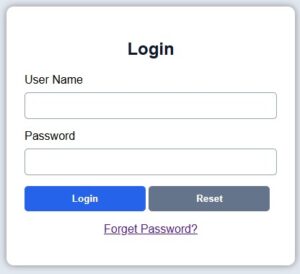
Example : How to make the Login Page in a JSP project? [PART – 01]
<%-- ==========================================================
     File Name : login.jsp
     Author    : Admin
     ========================================================== --%>

<%@page contentType="text/html" pageEncoding="UTF-8" import="java.sql.*"%>

<%
    /*----------------------------------------------------------
      Variable Declaration Section
      ----------------------------------------------------------*/

    // Variable to display login status message
    String msg = "";

    // Variables to store user name and password
    String uname = "";
    String pass = "";

    // Read username and password from login form
    uname = request.getParameter("UNAME1");
    pass = request.getParameter("PASS1");

    // Read the clicked button value
    String sub = request.getParameter("SUB1");


    /*----------------------------------------------------------
      Login Authentication Section
      ----------------------------------------------------------*/

    // Check whether Login button is clicked
    if(sub != null && sub.equals("Login"))
    {
        Connection conn = null;
        PreparedStatement pst = null;
        ResultSet rs = null;

        try
        {
            // Load Oracle JDBC Driver
            Class.forName("oracle.jdbc.driver.OracleDriver");

            // Connect to Oracle Database
            conn = DriverManager.getConnection(
                "jdbc:oracle:thin:@localhost:1521:orcl",
                "System",
                "raj"
            );

            // SQL Query to verify user credentials
            pst = conn.prepareStatement(
                "SELECT * FROM UREG WHERE UNAME5=? AND PASSWORD5=?"
            );

            // Pass user entered values to SQL query
            pst.setString(1, uname);
            pst.setString(2, pass);

            // Execute SQL query
            rs = pst.executeQuery();


            /*--------------------------------------------------
              If login is successful
              --------------------------------------------------*/
            if(rs.next())
            {
                // Create user session
                session.setAttribute("LOGIN", "YES");
                session.setAttribute("USERNAME", uname);

                // Redirect to Dashboard page
                response.sendRedirect("dashboard.jsp");
                return;
            }
            else
            {
                // Display invalid login message
                msg = "Invalid Username or Password";
            }
        }
        catch(Exception e)
        {
            // Display database or program error
            msg = e.toString();
        }
        finally
        {
            // Close all database resources
            try
            {
                if(rs != null)
                    rs.close();

                if(pst != null)
                    pst.close();

                if(conn != null)
                    conn.close();
            }
            catch(Exception ex)
            {
            }
        }
    }
%>

<html>

<head>

<title>Login Page</title>

<style>

/*----------------------------------------------------------
    Page Background
----------------------------------------------------------*/
body{
    margin:0;
    padding:0;
    font-family:Arial;
    background:#e2e8f0;
}

/*----------------------------------------------------------
    Login Box Design
----------------------------------------------------------*/
.login-box{
    width:350px;
    margin:120px auto;
    background:white;
    padding:25px;
    border-radius:10px;
    box-shadow:0 0 10px gray;
}

/*----------------------------------------------------------
    Heading Style
----------------------------------------------------------*/
h2{
    text-align:center;
    color:#0f172a;
}

/*----------------------------------------------------------
    Text Box Design
----------------------------------------------------------*/
input[type=text],
input[type=password]{

    width:100%;
    padding:10px;
    margin-top:8px;
    margin-bottom:15px;
    border:1px solid #94a3b8;
    border-radius:5px;

}

/*----------------------------------------------------------
    Button Design
----------------------------------------------------------*/
input[type=submit],
input[type=reset]{

    width:48%;
    padding:10px;
    border:none;
    border-radius:5px;
    background:#2563eb;
    color:white;
    font-weight:bold;
    cursor:pointer;

}

/* Reset Button Color */
input[type=reset]{
    background:#64748b;
}

/*----------------------------------------------------------
    Message Label
----------------------------------------------------------*/
.msg{

    color:red;
    text-align:center;
    font-weight:bold;

}

</style>

</head>

<body>

<!--=========================================================
    Login Form Section
==========================================================-->

<div class="login-box">

<h2>Login</h2>

<!-- Display Login Message -->
<p class="msg"><%=msg%></p>

<!-- Login Form -->
<form method="post">

    <!-- User Name -->
    User Name
    <input type="text"
           name="UNAME1"
           required>

    <!-- Password -->
    Password
    <input type="password"
           name="PASS1"
           required>

    <!-- Login Button -->
    <input type="submit"
           name="SUB1"
           value="Login">

    <!-- Reset Button -->
    <input type="reset"
           value="Reset">

    <br><br>

    <!-- Forget Password Link -->
    <p align="center">
        <a href="forgetpassword.jsp">
            Forget Password?
        </a>
    </p>

</form>

</div>

</body>
</html>
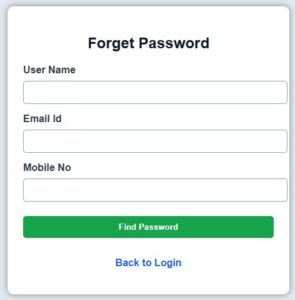
Example : How to create the Forgot Password Page in a JSP project.
<%--
    Document   : forgetpassword.jsp
    Author     : Admin
--%>

<%@page contentType="text/html" pageEncoding="UTF-8" import="java.sql.*"%>

<%
    // Message variable to display result or error
    String msg = "";

    // Variable to store password from database
    String password = "";

    // Receive values from HTML form
    String uname = request.getParameter("UNAME1");
    String email = request.getParameter("EMAIL1");
    String mobile = request.getParameter("MOBNO1");
    //String dob = request.getParameter("DOB1");

    // Receive submit button value
    String sub = request.getParameter("SUB1");

    // Check whether Find Password button is clicked
    if(sub != null && sub.equals("Find Password"))
    {
        Connection conn = null;
        PreparedStatement pst = null;
        ResultSet rs = null;

        try
        {
            // Load Oracle JDBC Driver
            Class.forName("oracle.jdbc.driver.OracleDriver");

            // Create connection with Oracle database
            conn = DriverManager.getConnection(
                "jdbc:oracle:thin:@localhost:1521:orcl",
                "System",
                "raj"
            );

            // SQL query to search password using name, email, mobile and DOB
            pst = conn.prepareStatement(
                "SELECT PASSWORD5 FROM UREG " +
                "WHERE TRIM(UNAME5)=? " +
                "AND TRIM(EMAIL5)=? " +
                "AND TRIM(MOBNO5)=? "
            );

            // Set form values into query parameters
            pst.setString(1, uname.trim());
            pst.setString(2, email.trim());
            pst.setString(3, mobile.trim());

            // Execute query
            rs = pst.executeQuery();

            // If record found, display password
            if(rs.next())
            {
                password = rs.getString("PASSWORD5");
                msg = "Your Password is : " + password;
            }
            else
            {
                msg = "Invalid User Name, Email, Mobile No or Date of Birth";
            }
        }
        catch(Exception e)
        {
            // Display database or coding error
            msg = e.toString();
        }
        finally
        {
            // Close database objects
            try
            {
                if(rs != null) rs.close();
                if(pst != null) pst.close();
                if(conn != null) conn.close();
            }
            catch(Exception ex)
            {
                msg = ex.toString();
            }
        }
    }
%>

<!DOCTYPE html>
<html>
<head>
    <title>Forget Password</title>

    <style>
        /* Page background and font */
        body{
            margin:0;
            padding:0;
            font-family:Arial;
            background:#e2e8f0;
        }

        /* Main password recovery box */
        .box{
            width:400px;
            margin:70px auto;
            background:white;
            padding:25px;
            border-radius:10px;
            box-shadow:0 0 10px gray;
        }

        /* Page heading */
        h2{
            text-align:center;
            color:#0f172a;
        }

        /* Label design */
        label{
            font-weight:bold;
            color:#334155;
        }

        /* Textbox design */
        input{
            width:100%;
            padding:10px;
            margin-top:8px;
            margin-bottom:15px;
            border:1px solid #94a3b8;
            border-radius:5px;
        }

        /* Submit button design */
        .btn{
            background:#16a34a;
            color:white;
            border:none;
            font-weight:bold;
            cursor:pointer;
        }

        /* Button hover effect */
        .btn:hover{
            background:#15803d;
        }

        /* Message design */
        .msg{
            color:red;
            text-align:center;
            font-weight:bold;
        }

        /* Login link design */
        a{
            color:#2563eb;
            text-decoration:none;
            font-weight:bold;
        }
    </style>
</head>

<body>

<!-- Main form box -->
<div class="box">

    <!-- Page heading -->
    <h2>Forget Password</h2>

    <!-- Display message -->
    <p class="msg"><%=msg%></p>

    <!-- Forget password form -->
    <form method="post">

        <!-- User name field -->
        <label>User Name</label>
        <input type="text" name="UNAME1" required>

        <!-- Email field -->
        <label>Email Id</label>
        <input type="email" name="EMAIL1" required>

        <!-- Mobile number field -->
        <label>Mobile No</label>
        <input type="text" name="MOBNO1" maxlength="10" required>

        <!-- Submit button -->
        <input type="submit" name="SUB1" value="Find Password" class="btn">

    </form>

    <!-- Back to login page -->
    <p align="center">
        <a href="login.jsp">Back to Login</a>
    </p>

</div>

</body>
</html>
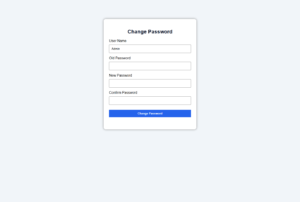
Example : How to create the Change Password Page in a JSP project.
<%-- ===============================================================
     File Name  : changepassword.jsp
     Author     : Admin
================================================================== --%>

<%@page contentType="text/html" pageEncoding="UTF-8" import="java.sql.*"%>

<%
    /*--------------------------------------------------------------
      Variable Declaration Section
     --------------------------------------------------------------*/

    String msg = "";

    String username = request.getParameter("UNAME1");
    String oldpass = request.getParameter("OLDPASS1");
    String newpass = request.getParameter("NEWPASS1");
    String confpass = request.getParameter("CONFPASS1");
    String sub = request.getParameter("SUB1");


    /*--------------------------------------------------------------
      Change Password Processing Section
      Executes only when Change Password button is clicked.
    --------------------------------------------------------------*/

    if (sub != null && sub.equals("Change Password"))
    {
        Connection conn = null;
        PreparedStatement pst = null;
        ResultSet rs = null;

        try
        {
            /*------------------------------------------------------
              Check whether New Password and Confirm Password
              are same or not.
            ------------------------------------------------------*/

            if (!newpass.equals(confpass))
            {
                msg = "New Password and Confirm Password do not match";
            }
            else
            {
                /*--------------------------------------------------
                  Load Oracle JDBC Driver
                --------------------------------------------------*/

                Class.forName("oracle.jdbc.driver.OracleDriver");

                /*--------------------------------------------------
                  Establish connection with Oracle Database
                --------------------------------------------------*/

                conn = DriverManager.getConnection(
                        "jdbc:oracle:thin:@localhost:1521:orcl",
                        "System",
                        "raj"
                );

                /*--------------------------------------------------
                  Verify User Name and Old Password
                --------------------------------------------------*/

                pst = conn.prepareStatement(
                        "SELECT * FROM UREG WHERE TRIM(UNAME5)=? AND TRIM(PASSWORD5)=?"
                );

                pst.setString(1, username.trim());
                pst.setString(2, oldpass.trim());

                rs = pst.executeQuery();

                /*--------------------------------------------------
                  If User Name and Old Password are correct,
                  update the password.
                --------------------------------------------------*/

                if (rs.next())
                {
                    pst = conn.prepareStatement(
                            "UPDATE UREG SET PASSWORD5=? WHERE TRIM(UNAME5)=?"
                    );

                    pst.setString(1, newpass.trim());
                    pst.setString(2, username.trim());

                    int x = pst.executeUpdate();

                    /*----------------------------------------------
                      Check whether password updated successfully.
                    ----------------------------------------------*/

                    if (x > 0)
                    {
                        msg = "Password Changed Successfully";
                    }
                    else
                    {
                        msg = "Password Not Changed";
                    }
                }
                else
                {
                    msg = "Old Password is Incorrect";
                }
            }
        }
        catch (Exception e)
        {
            msg = e.toString();
        }

    }
%>

<!DOCTYPE html>

<html>

<head>

    <!-- Page Title -->
    <title>Change Password</title>

    <style>

        /*----------------------------------------------------------
          Page Background
        ----------------------------------------------------------*/

        body{
            font-family:Arial;
            background:#f1f5f9;
        }

        /*----------------------------------------------------------
          Main Change Password Box
        ----------------------------------------------------------*/

        .box{
            width:380px;
            margin:80px auto;
            background:white;
            padding:25px;
            border-radius:10px;
            box-shadow:0 0 10px gray;
        }

        /*----------------------------------------------------------
          Heading Design
        ----------------------------------------------------------*/

        h2{
            text-align:center;
            color:#0f172a;
        }

        /*----------------------------------------------------------
          Textbox Design
        ----------------------------------------------------------*/

        input{
            width:100%;
            padding:10px;
            margin-top:8px;
            margin-bottom:15px;
        }

        /*----------------------------------------------------------
          Button Design
        ----------------------------------------------------------*/

        .btn{
            background:#2563eb;
            color:white;
            border:none;
            font-weight:bold;
            cursor:pointer;
        }

        /*----------------------------------------------------------
          Message Label Design
        ----------------------------------------------------------*/

        .msg{
            color:red;
            text-align:center;
            font-weight:bold;
        }

    </style>

</head>

<body>

<!--==============================================================
    Change Password Form
===============================================================-->

<div class="box">

    <!-- Page Heading -->
    <h2>Change Password</h2>

    <!-- Display Success/Error Message -->
    <p class="msg"><%=msg%></p>

    <!-- Change Password Form -->
    <form method="post">

        User Name
        <input type="text"
               name="UNAME1"
               required>


        Old Password
        <input type="password"
               name="OLDPASS1"
               required>


        New Password
        <input type="password"
               name="NEWPASS1"
               required>


        Confirm Password
        <input type="password"
               name="CONFPASS1"
               required>


        <input type="submit"
               name="SUB1"
               value="Change Password"
               class="btn">

    </form>

</div>

</body>

</html>
Example : How to make the Login Page in a JSP project? [PART – 02]
STEP 1 : CREATE LOGIN PAGE FIRST (login.jsp)

<%@page contentType="text/html" pageEncoding="UTF-8"%>

<!DOCTYPE html>
<html>
<head>

    <title>Login Page</title>

    <style>

        body
        {
            font-family: Arial;
            background:#e6f2ff;
        }

        .loginbox
        {
            width:350px;
            margin:120px auto;
            padding:30px;
            background:white;
            border-radius:10px;
            box-shadow:0px 0px 10px gray;
        }

        h2
        {
            text-align:center;
            color:#003366;
        }

        input[type=text],
        input[type=password]
        {
            width:100%;
            height:40px;
            margin-top:10px;
            margin-bottom:20px;
            padding-left:10px;
            font-size:16px;
        }


        input[type=submit],
        input[type=reset]
        {
            width:100%;
            height:40px;
            background:#003366;
            color:white;
            border:none;
            font-size:18px;
            border-radius:5px;
            margin-top: 5px;
        }

    </style>

</head>

<body>

    <div class="loginbox">

        <h2>User Login</h2>

        <form action="oywfNewLoginCheck.jsp" method="post">

            <label>Login ID</label>

            <input type="text" name="lid" required>

            <label>Password</label>

            <input type="password" name="pss" required>

            <input type="submit" value="Login">

            <input type="reset" value="Reset">

        </form>

    </div>

</body>
</html>

STEP 2 : CREATE LOGIN PAGE VALIDATION (logincheck.jsp)

<%@page import="java.sql.*"%>

<%
    String lid = request.getParameter("lid");
    String pss = request.getParameter("pss");

    Connection con = null;
    PreparedStatement ps = null;
    ResultSet rs = null;

    try
    {
        Class.forName("oracle.jdbc.driver.OracleDriver");

        con = DriverManager.getConnection(
            "jdbc:oracle:thin:@localhost:1521:orcl",
            "system",
            "raj"
        );

        String sql = "SELECT * FROM FINALADAM WHERE LID=? AND PSS=?";

        ps = con.prepareStatement(sql);

        ps.setString(1, lid);
        ps.setString(2, pss);

        rs = ps.executeQuery();

        if(rs.next())
        {
            session.setAttribute("user", lid);

            response.sendRedirect("home.jsp");
        }
        else
        {
            out.println("<script>alert('Invalid Login ID or Password'); window.location='login.jsp';</script>");
        }

    }
    catch(Exception e)
    {
        out.println(e);
    }
%>

STEP 3 : CREATE HOME PAGE (home.jsp)

<%
    String user = (String)session.getAttribute("user");

    if(user == null)
    {
        response.sendRedirect("login.jsp");
    }
%>

<!DOCTYPE html>
<html>
<head>

    <title>Home Page</title>

</head>

<body>

    <h1>Welcome To Home Page</h1>

    <h2>
        Logged User :
        <%=user%>
    </h2>

    <a href="logout.jsp">Logout</a>

</body>
</html>

STEP 4 : CREATE LOGOUT PAGE (logout.jsp)

<%
    session.invalidate();

    response.sendRedirect("login.jsp");
%>

STEP 5 : CREATE ORACLE 10g TABLE AND FEED DATA INTO IT

CREATE TABLE FINALADAM
(
    LID VARCHAR2(50),
    PSS VARCHAR2(50)
);

-------------------------------------------

INSERT INTO FINALADAM VALUES('admin','123');
COMMIT;

INSERT INTO FINALADAM VALUES('admin','admin');
COMMIT;

STEP 6 : HOW TO MAKE LOGIN PAGE RUN FIRST IN JSP USING NET BEANS 8.2.

click this link 
0 Comments