Table of Contents
hide
Ques. : How to download an image in the ‘drawable’ folder of an Android application using XML code in a LinearLayout View?
How to Download Image in 'Drawable' Folder:

First of all copy the image file - paste in 'drawable' folder say abc.jpg.(default stored Location in computer = C:\Users\Your user name\AndroidStudioProjects\yourProjectName\app\src\main\res\ drawable).

                                      OR

First of all copy the image file - simply paste in 'drawable' folder.(app - res - drawable - right click on drawable folder - paste)
Ques. : How to design/set a full background image in an Android application using XML code in a LinearLayout View?
<?xml version="1.0" encoding="utf-8"?>
<LinearLayout xmlns:android="http://schemas.android.com/apk/res/android"
    xmlns:app="http://schemas.android.com/apk/res-auto"
    xmlns:tools="http://schemas.android.com/tools"

    android:id="@+id/main"
    android:layout_width="match_parent"
    android:layout_height="match_parent"
    tools:context=".MainActivity">

    <TextView
        android:layout_width="match_parent"
        android:layout_height="match_parent"

        android:background="@drawable/abc"/>
</LinearLayout>
Ques. : How to design/set a customized or partial background image in an Android application using XML code in a LinearLayout View?
<?xml version="1.0" encoding="utf-8"?>
<LinearLayout xmlns:android="http://schemas.android.com/apk/res/android"
    xmlns:app="http://schemas.android.com/apk/res-auto"
    xmlns:tools="http://schemas.android.com/tools"

    android:layout_width="match_parent"
    android:layout_height="match_parent"
    android:contentDescription="@string/app_name"
    android:orientation="vertical"
    tools:context=".MainActivity"
    android:layout_margin="20dp">

    <ImageView
        android:layout_width="match_parent"
        android:layout_height="300dp"
        android:id="@+id/ImgView1"
        android:src="@drawable/ic_launcher_background"
        android:scaleType="fitXY"
        android:adjustViewBounds="true"
        android:contentDescription="Description of Image"/>
</LinearLayout>
Ques. : How to design/set a full background color in an Android application using XML code in a LinearLayout View?
<?xml version="1.0" encoding="utf-8"?>
<LinearLayout xmlns:android="http://schemas.android.com/apk/res/android"
    xmlns:app="http://schemas.android.com/apk/res-auto"
    xmlns:tools="http://schemas.android.com/tools"
    android:id="@+id/main"
    android:layout_width="match_parent"
    android:layout_height="match_parent"
    tools:context=".MainActivity">

    <TextView
        android:layout_width="match_parent"
        android:layout_height="match_parent"

        android:background="@color/red"/>

</LinearLayout>
Ques. : How can you design/set a custom/partial background color in an Android application using XML code in a LinearLayout View?
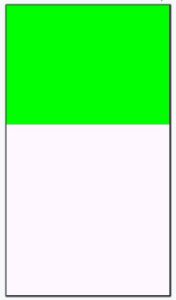
<?xml version="1.0" encoding="utf-8"?>
<LinearLayout xmlns:android="http://schemas.android.com/apk/res/android"
    xmlns:app="http://schemas.android.com/apk/res-auto"
    xmlns:tools="http://schemas.android.com/tools"
    android:id="@+id/main"
    android:layout_width="match_parent"
    android:layout_height="match_parent"
    android:orientation="vertical"
    tools:context=".MainActivity">

    <ImageView
        android:layout_width="match_parent"
        android:layout_height="300dp"

        android:src="@color/green"
        android:id="@+id/ImgView1"

        android:scaleType="fitXY"
        android:adjustViewBounds="true"/>
</LinearLayout>

--------------  OR  -------------

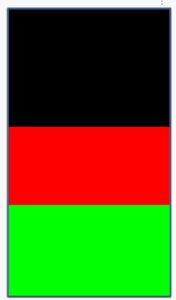
<?xml version="1.0" encoding="utf-8"?>
<LinearLayout xmlns:android="http://schemas.android.com/apk/res/android"
    xmlns:app="http://schemas.android.com/apk/res-auto"
    xmlns:tools="http://schemas.android.com/tools"
    android:id="@+id/main"
    android:layout_width="match_parent"
    android:layout_height="match_parent"
    android:orientation="vertical"
    tools:context=".MainActivity">

    <ImageView
        android:layout_width="match_parent"
        android:layout_height="300dp"

        android:src="@color/black"
        android:id="@+id/ImgView1"

        android:scaleType="fitXY"
        android:adjustViewBounds="true"/>

    <ImageView
        android:layout_width="match_parent"
        android:layout_height="200dp"

        android:src="@color/red"
        android:id="@+id/ImgView2"

        android:scaleType="fitXY"
        android:adjustViewBounds="true"/>

    <ImageView
        android:layout_width="match_parent"
        android:layout_height="400dp"

        android:src="@color/green"
        android:id="@+id/ImgView3"

        android:scaleType="fitXY"
        android:adjustViewBounds="true"/>
</LinearLayout>

--------------  OR  -------------

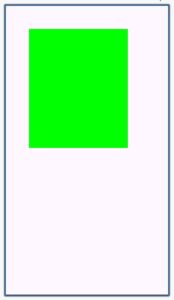
<?xml version="1.0" encoding="utf-8"?>
<LinearLayout xmlns:android="http://schemas.android.com/apk/res/android"
    xmlns:app="http://schemas.android.com/apk/res-auto"
    xmlns:tools="http://schemas.android.com/tools"
    android:id="@+id/main"
    android:layout_width="match_parent"
    android:layout_height="match_parent"
    android:orientation="vertical"
    tools:context=".MainActivity">

    <ImageView
        android:layout_width="250dp"
        android:layout_height="300dp"

        android:layout_margin="60dp"

        android:src="@color/green"
        android:id="@+id/ImgView1"

        android:scaleType="fitXY"
        android:adjustViewBounds="true"/>
</LinearLayout> 
0 Comments